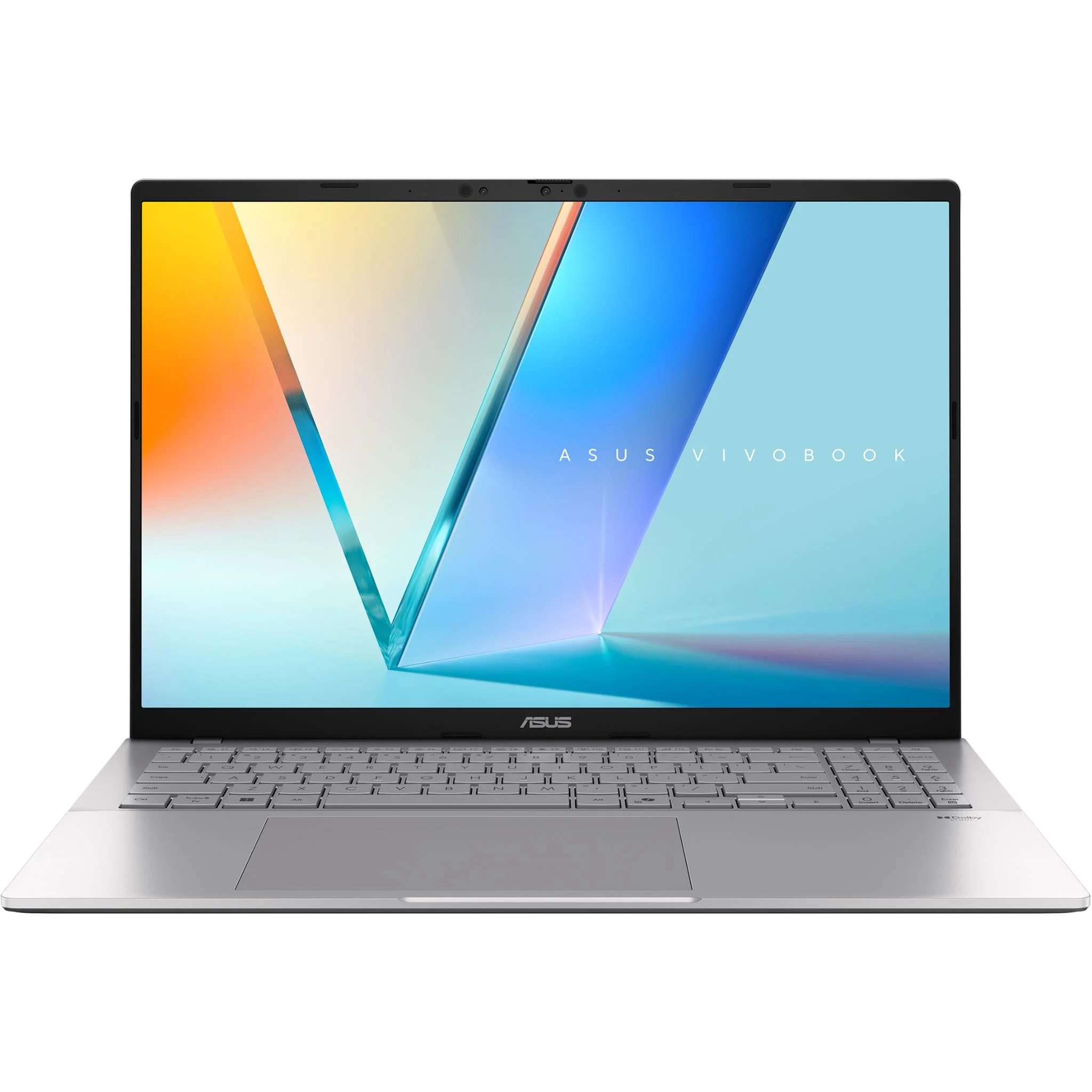
The ASUS VivoBook lineup has always aimed to deliver a lot of laptop for the money to everyday consumers. The S16 S3607QA continues that tradition with a genuinely impressive spec sheet on paper: a 2.5K 144Hz display, 32GB of RAM, 1TB of storage, and a Snapdragon X processor that qualifies this machine as a Copilot+ PC with Microsoft’s full suite of AI features.
At first glance it looks like outstanding value. But the pricing situation on this laptop tells a bigger story about what’s happening in the Australian laptop market right now, and it’s worth understanding before you commit.
Key Specifications
- Display: 16″ 2.5K WQXGA (2560 x 1600), IPS-level, 16:10, 144Hz, 400 nits, 100% sRGB, anti-glare, TÜV Rheinland certified
- Processor: Qualcomm Snapdragon X X1-26-100 (8 cores, 8 threads, up to 2.97GHz, 30MB cache)
- Memory: 32GB LPDDR5X (soldered, not upgradable)
- Storage: 1TB M.2 NVMe PCIe 4.0 SSD
- Graphics: Qualcomm Adreno GPU (integrated)
- NPU: Qualcomm Hexagon NPU up to 45 TOPS (Copilot+ PC certified)
- Operating System: Windows 11 Home
- Wireless: Wi-Fi 6E (triple band, 2×2), Bluetooth 5.3
- Battery: 70Wh, 3-cell Li-ion, 65W USB-C charging
- Weight: 1.74kg
- Dimensions: 35.70 x 25.07 x 1.59-1.79cm
- Ports: 2x USB4 Type-C 40Gbps (USB PD, DisplayPort), 2x USB-A 3.2 Gen 1 (5Gbps), 1x HDMI 2.1, 1x 3.5mm audio
- Webcam: 1080p FHD with privacy shutter, IR for Windows Hello
- Keyboard: Backlit chiclet with numeric keypad, 1.7mm key travel, Copilot key
- Security: Firmware TPM, Microsoft Pluton, BIOS password protection, IR webcam
- Certification: MIL-STD-810H, Energy Star 8.0
- Part Number: S3607QA-PL063W
- Price: $1,799 at JB Hi-Fi and Centrecom / $1,401 at JW Computers (no stock)
The Pricing Story You Need to Know
Before getting into the review, the pricing situation needs to be addressed honestly because it’s actually the most important context for this laptop.
- JB Hi-Fi: $1,799
- Centrecom: $1,799
- JW Computers: $1,401 (no stock)
JW Computers’ $1,401 price is almost certainly what this laptop was selling for across most retailers just a few weeks ago. The $400 jump to $1,799 at JB Hi-Fi and Centrecom is not a coincidence. This is precisely the kind of market-wide price movement I have warned about in my Warning: Laptop Prices Are About to Jump 10-20% post from December 2025. In fact, prices have shifted more than I predicted at the time unfortunately with many computer retailers taking advantage of the situation to push prices even higher.
My How AI is Pushing Up the Cost of Computers and Parts article explains the underlying reasons driving these increases, with RAM and storage costs being significant contributors.
At $1,401 this laptop represented genuinely strong value. At $1,799 it’s still a reasonable package for what you’re getting, but the equation has tightened considerably. And unfortunately, waiting for prices to come back down isn’t a realistic strategy. Based on what we’re seeing across the broader market, laptop prices are going to stay high, and likely for a long time. This applies to almost every laptop on sale right now, not just this one. If you need a laptop, buying sooner rather than later is probably the right call, because prices don’t look like they’re going anywhere but up.
Design and Build Quality

The VivoBook S16 S3607QA arrives in Cool Silver, which is ASUS’s take on the modern professional-looking laptop finish. It’s clean and understated without being boring.
At 1.74kg it’s reasonable for a 16-inch laptop but not particularly light. If portability is a top priority, a 14-inch machine will serve better. If you want more screen real estate for work and productivity, the extra weight is the trade-off you’re accepting.
The slim 1.59-1.79cm profile is decent for a 16-inch, and the 89% screen-to-body ratio gives the machine a modern look. MIL-STD-810H military-grade certification provides reassurance against everyday bumps and environmental stresses.
The overall build feels solid enough for daily professional use. The VivoBook line has historically sat below ASUS’s ZenBook range in the premium hierarchy, so while this is a well-made laptop, it doesn’t quite reach the premium feel of higher-tier machines.
Display

The display is a genuine highlight of this laptop and one of the better panels I’ve reviewed in this price range.
Key specs worth knowing:
- 2.5K (2560 x 1600) resolution – sharper than the more common WUXGA panels on competing laptops
- 144Hz refresh rate – smooth scrolling, fluid animations, and responsive gaming if you choose to play
- 100% sRGB colour coverage – vibrant, accurate colours suitable for creative work
- 400 nits brightness – comfortably usable in most indoor lighting conditions
- 16:10 aspect ratio – more vertical space for productivity compared to 16:9 alternatives
- TÜV Rheinland certification – validated for low blue light emission
This is the kind of display that makes a real difference to your daily experience. Whether you’re working on documents, watching video content, or handling light creative work, the combination of resolution, refresh rate, and colour accuracy is genuinely excellent for a machine at this price. It’s a significant step up from the 62.5% sRGB and 300 nit panels I have been calling out on many competing laptops.
Performance
Here’s where you need to understand exactly what you’re buying.
The VivoBook S16 S3607QA uses the Qualcomm Snapdragon X X1-26-100 processor. This is important context: the Snapdragon X family has three main tiers – the Snapdragon X (entry-level), the Snapdragon X Plus (mid-range), and the Snapdragon X Elite (flagship). This laptop uses the entry-level Snapdragon X.
What that means in practical terms:
- Day-to-day performance is fine for web browsing, email, Office applications, video calls, and everyday productivity
- Battery efficiency is excellent compared to Intel and AMD x86 alternatives
- The 45 TOPS NPU qualifies this as a Copilot+ PC, unlocking the full suite of Microsoft AI features
- Sustained heavy workloads can cause the chip to struggle – if you regularly run demanding applications for extended periods, this processor may not keep up
- Software compatibility is the big consideration – ARM-based Windows cannot natively run all x86 software, and some older or specialised applications either run through emulation (slower) or don’t run at all
If you rely on specific business or creative applications, verify compatibility with Windows on ARM before committing. Mainstream productivity apps, browsers, and Microsoft Office all run natively and work well. Legacy and niche software is where the concerns lie.
The 32GB of LPDDR5X memory is a genuine strength and is unusual at this price point. Most competing laptops at this price point typically come with 16GB, making this a standout configuration for anyone who works with multiple applications simultaneously.
The 1TB NVMe SSD provides generous storage and fast load times.
Windows Home
The VivoBook S16 ships with Windows 11 Home, which is appropriate for the everyday consumer this laptop is aimed at. If you do need Pro features for business use, a Microsoft upgrade is available for around $139.
Windows 11 Home does lack some features that professional users often need, including:
- BitLocker drive encryption
- Remote Desktop hosting
- Domain join capability
- Group Policy management
For the typical consumer doing a bit of everything, Home is perfectly fine and saves you the upgrade cost.
Keyboard and Trackpad

The backlit chiclet keyboard is comfortable for extended typing sessions with reasonable 1.7mm key travel and sensible layout. The inclusion of a numeric keypad is practical for spreadsheet and data work.
The Copilot key is present, which on most laptops means the loss of the right Ctrl key. This is becoming an industry-wide trend and frustration.
The precision touchpad is smooth and handles everyday navigation and multi-touch gestures reliably.
Connectivity

The port selection is strong with some really useful inclusions.
Dual USB4 ports at 40Gbps is a significant feature at this price. Both support Power Delivery and DisplayPort Alt mode, meaning you can charge from either side and connect external monitors or fast external storage without needing adapters. USB4 delivers the same 40Gbps speed as Thunderbolt 4.
The two USB-A 3.2 Gen 1 ports at 5Gbps cover legacy peripherals comfortably, and HDMI 2.1 handles external display connectivity.
The one connectivity step down compared to the latest premium laptops is Wi-Fi 6E rather than Wi-Fi 7. For most users in 2026 this won’t be noticeable day-to-day, and Wi-Fi 6E remains more than capable for current home and office networks.

No ethernet port is included, which is common on thin and light laptops but worth noting if wired networking matters to you.
Battery Life
ASUS claims up to 32 hours of battery life on this laptop. Before you get excited, that figure is based on 1080p video playback with Wi-Fi disabled, the keyboard backlight turned off, and brightness set to a modest 150 cd/m². In other words, it’s a highly optimised test scenario that bears little resemblance to how anyone actually uses a laptop day-to-day.
In the real world, expect somewhere around 10 to 12 hours of typical use covering emails, documents, web browsing, and video streaming. That’s still really good and reflects the efficiency advantage of ARM-based Snapdragon X compared to Intel or AMD x86 alternatives.
That’s enough for a full working or study day without needing to reach for the charger, which is one of the practical benefits of choosing an ARM-based laptop. Heavier workloads will bring that number down, but for general daily use the battery performance is a real strength.
The gap between ASUS’s 32-hour claim and real-world 10-12 hour reality is significant, and it’s worth calling out. Manufacturers across the industry love to publish optimistic battery figures based on unrealistic test conditions, and consumers should treat these numbers with a healthy dose of scepticism.
Pros
- 2.5K 144Hz display with 100% sRGB is excellent at this price point
- 32GB RAM is genuinely generous at $1,799
- 1TB SSD storage is ample for most users
- Dual USB4 40Gbps ports with Power Delivery and DisplayPort
- Copilot+ PC certified with 45 TOPS NPU
- 1080p FHD webcam with privacy shutter and Windows Hello
- Backlit keyboard with numeric keypad
- MIL-STD-810H certification
- Solid battery life of 10-12 hours in typical use
- ARM-based Snapdragon X delivers excellent power efficiency
Cons
- Snapdragon X is the entry-level chip in the X series
- Can struggle under sustained heavy workloads
- ARM architecture means some software compatibility limitations
- Wi-Fi 6E rather than Wi-Fi 7
- Recent $400 price hike from $1,401 to $1,799 has tightened the value equation
- 1.74kg is not particularly light for a 16-inch thin and light
Final Verdict
The ASUS VivoBook S16 S3607QA is a laptop with genuine strengths that remains a reasonable option in the current market, but the pricing story is really the headline here.
The display is excellent. The 32GB of RAM and 1TB SSD are generous. The Copilot+ PC certification and USB4 connectivity are forward-looking inclusions. For users who primarily live in Office, browsers, and mainstream productivity apps, this laptop delivers a premium daily experience.
The compromises are real but not deal-breaking for the right buyer. The entry-level Snapdragon X isn’t the most powerful chip in the family, and ARM-based Windows requires some consideration around software compatibility. Windows 11 Home on a $1,799 laptop is a bit mean-spirited.
The bigger issue is that you’re paying $400 more than you would have just a few weeks ago for the same laptop. That’s frustrating, but it reflects the broader market reality. And unfortunately, prices aren’t coming back down anytime soon. The conditions driving these increases aren’t short-term, and we expect laptop prices to remain elevated for the foreseeable future. If you need a laptop, waiting for a better deal probably isn’t going to pay off.
If you’re still working out what to prioritise in a laptop at this price point, my Student Laptop Buying Guide cover what matters most. And as always, the broader market context in my laptop price warning article is worth reading before you commit.