The budget laptop market is filled with compromises. Manufacturers juggle where to spend money and where to cut corners, trying to deliver adequate performance without breaking the bank. Acer’s Aspire series has long been a staple in this space, offering various configurations aimed at students, families, and budget-conscious buyers who need a Windows laptop for everyday computing.
The Acer Aspire Go 14 AG14-71M-51F1 is an interesting proposition. On paper, it packs genuinely impressive specs for a budget laptop – an Intel Core Ultra 5 125H processor (the same chip you’d find in much pricier laptops), 16GB of DDR5 RAM, and a comprehensive port selection including Gigabit Ethernet. These are specifications you’d typically expect on laptops costing significantly more.
At $798 on sale at Harvey Norman (down from $1,298), this appears to be a Harvey Norman exclusive model – one of those retailer-specific configurations designed to prevent easy price comparison. But with a Core Ultra 5 processor at under $800, it looks like exceptional value on paper. The question is: where did Acer cut corners to hit this price point, and are those compromises liveable? Let’s dig in.

Pros
- Intel Core Ultra 5 125H is powerful for the price
- Strong sale price at $798
- Excellent port selection including Ethernet
Cons
- Very heavy at 2.6kg
- Noisy fan under load
- Average performance despite strong CPU
Key Specifications
- Display: 14″ IPS LCD, FHD+ (1920 x 1200), 60Hz, ComfyView matte, 16:10 aspect ratio
- Processor: Intel Core Ultra 5 125H (14 cores, 18 threads, 1.2 GHz base)
- Memory: 16 GB DDR5 SDRAM
- Storage: 512 GB PCIe NVMe 4.0 SSD (M.2)
- Graphics: Intel integrated graphics (shared memory)
- Operating System: Windows 11 Home
- Ports: 2x USB-A 3.2 Gen 1, 2x USB-C 3.2 Gen 2 (10Gbps), HDMI 2.1, RJ45 Gigabit Ethernet, 3.5mm headphone/speaker, microSD card reader
- Wireless: Wi-Fi 6 (802.11ax), Gigabit Ethernet
- Audio: 2 speakers
- Keyboard: Non-backlit
- Weight: 2.6 kg
- Power: 65W adapter
- Colour: Iron
- Warranty: 12 months (assumed standard)
- Price: Harvey Norman $798 (on sale from $1,298) – Harvey Norman exclusive
Design and Build Quality

Let’s address the elephant in the room first: at 2.6kg, this is outrageously heavy for a 14-inch laptop. For context, most 14-inch laptops weigh between 1.2-1.6kg. Even 15.6-inch budget laptops typically weigh around 1.7-1.9kg. The Aspire Go 14 weighs more than many 15.6-inch laptops, which makes absolutely no sense for a 14-inch form factor.
This excessive weight likely comes from cheap, thick plastic construction and potentially inadequate cooling requiring more substantial heatsinks. Whatever the reason, carrying this laptop around feels more like lugging a textbook than a modern portable computer. For students carrying it between lectures or professionals commuting, the weight will be immediately and constantly noticeable.
The build quality matches the budget positioning. The plastic chassis in “Iron” (grey) feels cheap and flexes noticeably when you pick it up. The lid flexes easily, and the keyboard deck gives way under pressure while typing. This is budget laptop construction at its most transparent – no pretence of premium materials or solid engineering.
There’s no fingerprint reader for biometric login, which is disappointing but not surprising at this price. The overall aesthetic is plain and functional – this laptop won’t turn any heads, but it won’t embarrass you in professional settings either. It just looks… boring.
For a laptop you’ll primarily use at a desk, the poor build quality and excessive weight are tolerable. For anyone needing genuine portability, they’re deal-breakers.
Display
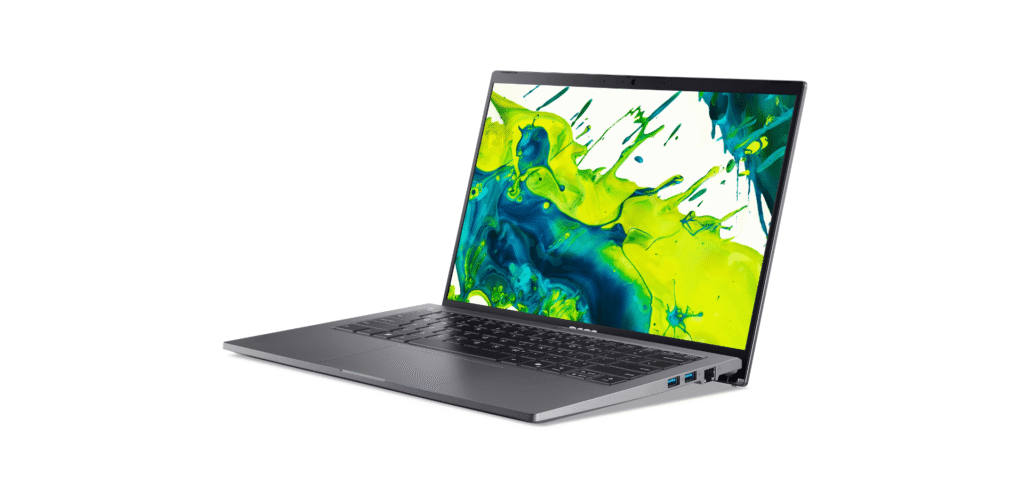
The 14-inch IPS display with 1920 x 1200 resolution in a 16:10 aspect ratio is one of the better aspects of this laptop. The extra vertical space compared to 16:9 displays helps with productivity work – documents and web pages require less scrolling.
The IPS panel delivers decent viewing angles and adequate colour reproduction for general use. It’s not colour-accurate enough for professional creative work, but for everyday computing, it’s perfectly functional. The ComfyView matte finish reduces glare and reflections, which helps with usability in various lighting conditions.
Text appears sharp and clear at the native resolution, making document work and web browsing pleasant enough. The 60Hz refresh rate is standard for budget laptops – don’t expect the smoothness of high-refresh displays, but it’s fine for productivity tasks.
Brightness isn’t specified, but based on typical budget laptops, expect around 220-250 nits. This means outdoor use will be challenging, and even bright indoor environments might require you to crank up the brightness. Still, for indoor use in typical office or home lighting, it’s adequate.
The display won’t wow you, but it does its job competently. It’s a functional panel that gets out of the way and lets you work, which is really all you need from a budget laptop display.
Performance
Here’s where things get interesting and frustrating in equal measure. The Intel Core Ultra 5 125H is a genuinely powerful processor – it’s from Intel’s latest “Meteor Lake” generation with 14 cores (6 performance cores + 8 efficiency cores) and 18 threads. This is the same processor you’d find in laptops costing $1,500-2,000.
On paper, this should deliver excellent performance for productivity work, multitasking, and even light creative tasks. The 16GB of DDR5 RAM provides plenty of memory bandwidth, and the 512GB PCIe NVMe 4.0 SSD ensures quick storage performance.
So why did I note “average performance” as a drawback?
The answer is thermal management. Cramming a powerful 14-core processor into a budget laptop chassis with inadequate cooling means the processor can’t maintain its boost clocks under sustained load. It’ll thermal throttle – reducing clock speeds to prevent overheating – which limits real-world performance despite the impressive specs.
The “noisy fan” supports this. Under load, the cooling system works overtime trying to dissipate heat, spinning up to loud, distracting speeds. You’ll hear the fan constantly during any moderately intensive tasks, and it might even spin up during basic web browsing if the thermal design is particularly poor.
In practice, you’re getting:
- Light tasks (web browsing, document editing): Works fine, though fan noise is annoying
- Moderate multitasking: Handles adequately but gets warm and loud
- Intensive tasks (video editing, photo processing): Throttles significantly, performance disappoints
The integrated Intel graphics handle basic tasks fine – video playback, light photo editing, very casual gaming on older titles. Don’t expect to play modern games or do GPU-intensive work.
The 512GB SSD provides decent storage with quick boot times and application loading, though it’s smaller than the 1TB drives we’ve seen on some competitors.
Keyboard and Trackpad
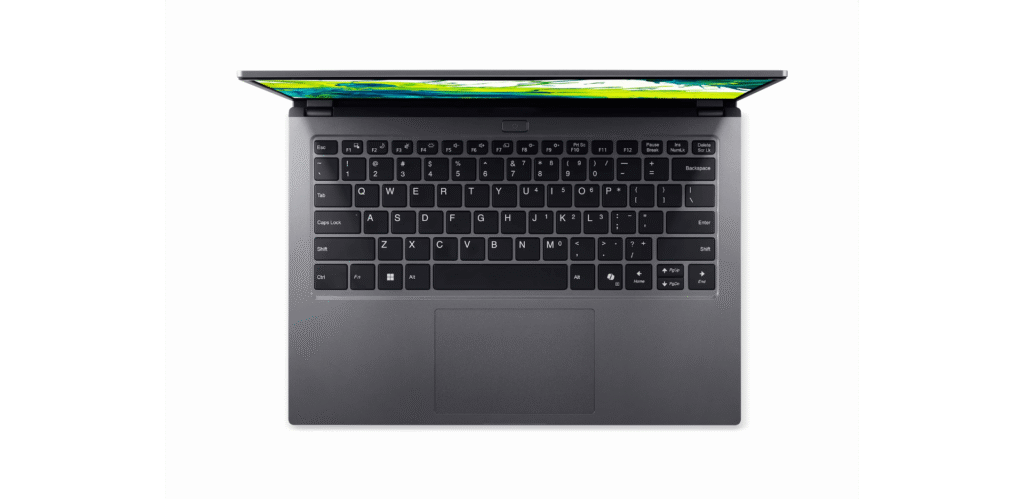
The keyboard lacks backlighting, which is frustrating but unfortunately common on budget laptops. Working in dim conditions means fumbling for keys or needing external lighting.
Key feel is functional but unremarkable. The keys have reasonable travel and tactile feedback, though the flexing keyboard deck undermines the typing experience. Press down while typing and you’ll feel the entire area give way, which is disconcerting during longer typing sessions.
The trackpad is adequately sized and should support Windows Precision drivers for reliable multi-touch gestures. It gets the job done without being impressive.
Overall, the input experience is merely adequate – it won’t actively hinder your work, but it won’t make typing or navigation particularly pleasant either.
Ports and Connectivity
Here’s where Acer actually delivered. The port selection is genuinely excellent for a budget laptop:
- 2x USB-A 3.2 Gen 1 (5Gbps)
- 2x USB-C 3.2 Gen 2 (10Gbps)
- HDMI 2.1 (supports 4K@120Hz or 8K@60Hz)
- RJ45 Gigabit Ethernet
- 3.5mm headphone/speaker jack
- microSD card reader
Having Gigabit Ethernet on a budget laptop is genuinely useful – wired connections provide more stable, lower-latency connectivity than Wi-Fi, which matters for video calls, large file transfers, or online gaming. Many modern laptops omit Ethernet ports, so having one here is welcome.
The HDMI 2.1 port is future-proofed for modern displays and TVs. The two USB-C ports running at 10Gbps (Gen 2) provide fast data transfer, though it’s not clear if they support Power Delivery charging or DisplayPort output.
The microSD card reader is handy for photographers or anyone regularly transferring files from cameras or other devices.
Wi-Fi 6 (802.11ax) provides fast wireless connectivity when Ethernet isn’t available.
This port selection is genuinely comprehensive and punches well above the laptop’s price point. It’s one area where Acer didn’t cut corners.
Audio
The reviewer noted “below average speakers,” and this is typical for budget laptops. The dual speakers likely produce thin, tinny audio with minimal bass response. They’ll be adequate for system sounds and maybe video calls, but music, movies, or any serious media consumption will require headphones or external speakers.
Don’t expect volume, clarity, or depth from these speakers. Factor in the cost of decent headphones when budgeting for this laptop.
Battery Life
Battery capacity isn’t specified, which is never a good sign. Given the heavy weight (2.6kg), you’d hope for a large battery, but that weight is more likely from cheap construction and cooling hardware.
With a power-hungry 14-core processor and likely modest battery, expect:
- Light use: 4-6 hours
- Mixed use: 3-5 hours
- Intensive tasks: 2-3 hours
For a laptop this heavy, you’d expect better battery life as compensation for the poor portability. Unfortunately, you’re likely getting neither portability nor endurance. The 65W power adapter will be a constant companion.
Thermal Performance
The “noisy fan” complaint deserves emphasis. This laptop gets loud under load – the cooling system struggles to manage the powerful processor in a budget chassis. Expect frequent, distracting fan noise even during moderate tasks.
The laptop will also get noticeably warm, particularly around the keyboard and bottom chassis. This thermal struggling explains the “average performance” despite the strong processor – thermal throttling limits real-world performance.
For anyone working in quiet environments (libraries, offices, shared spaces), the fan noise will be genuinely problematic.
Harvey Norman Exclusive Considerations
This appears to be a Harvey Norman group exclusive model, meaning you can’t easily price compare across retailers. These exclusive model numbers are designed to prevent comparison shopping, keeping customers from finding better deals elsewhere.
Before buying, try to find similar Acer Aspire models with comparable specs at other retailers to verify you’re actually getting good value. The $798 price looks good for the specs, but exclusive models often have hidden compromises that justify the lower price.
Pros:
- Intel Core Ultra 5 125H is powerful on paper – modern 14-core processor
- 16GB DDR5 RAM rare at this price point
- Excellent port selection including Gigabit Ethernet
- HDMI 2.1 future-proofs for modern displays
- 2x USB-C ports at 10Gbps (Gen 2)
- microSD card reader included
- 16:10 display provides extra vertical space
- Wi-Fi 6 for fast wireless connectivity
- Strong sale price at $798 for these specs
- 512GB NVMe SSD provides decent storage
Cons:
- Outrageously heavy at 2.6kg for 14″ laptop – terrible portability
- Very noisy fan under load – distracting in quiet environments
- Average actual performance due to thermal throttling despite strong CPU
- Below average speakers require headphones
- No keyboard backlighting
- Cheap plastic build with noticeable flex
- Likely poor battery life with power-hungry processor
- Gets noticeably warm during use
- Harvey Norman exclusive prevents price comparison
- No fingerprint reader
- Boring, generic design
Final Verdict
The Acer Aspire Go 14 AG14-71M-51F1 is a frustrating laptop to evaluate. On paper, the specs look excellent for $798 – a Core Ultra 5 processor, 16GB of DDR5 RAM, and comprehensive ports are genuinely impressive at this price. But the execution undermines those promising specifications.
The excessive 2.6kg weight is unforgivable for a 14-inch laptop. You’re getting worse portability than many 15.6-inch budget laptops, which defeats the purpose of choosing a smaller form factor. The thermal management struggles result in loud fan noise and throttled performance, meaning you don’t get the full benefit of that powerful processor. The cheap plastic construction and below-average speakers remind you constantly that this is a budget device.
At $798, the value proposition depends entirely on your use case:
Consider buying if you:
- Need a desk-bound laptop that won’t move much (weight doesn’t matter)
- Prioritize port selection (Ethernet, HDMI 2.1, multiple USB-C)
- Work in noisy environments (fan noise won’t bother you)
- Need adequate performance for productivity work
- Are shopping at Harvey Norman anyway
Avoid if you:
- Need genuine portability (the weight is a deal-breaker)
- Work in quiet environments (fan noise will drive you mad)
- Want consistent performance under load (thermal throttling limits this)
- Need decent speakers (they’re terrible)
- Expect quality build (it’s cheap plastic)
For students who need to carry their laptop daily, this is a poor choice – the weight alone disqualifies it. For home users who want a stationary laptop for a desk and can tolerate fan noise, the strong specs at $798 might justify the compromises.
Better alternatives exist: the HP Laptop 15-fc0433AU at $697-699 offers similar specs with less weight, the Lenovo IdeaPad Slim 3 typically delivers better build quality, and the ASUS VivoBook 15 often provides superior displays and thermals for similar money.
If you’re shopping at Harvey Norman specifically and this is on sale, it represents okay value purely on specs. But factor in the compromises – weight, noise, thermals, build quality – before committing. For most users, spending slightly more on a better-executed laptop will result in a far more satisfying experience over the laptop’s lifetime.
At $798, it’s not a bad deal, but it’s not a great laptop. Choose accordingly based on whether you can live with its significant limitations.