The 16-inch laptop market has become the new standard for larger productivity machines. As we discussed in the LG Gram 17 review, the laptop industry has consolidated around 14-inch and 16-inch sizes, abandoning the once-common 15-inch and nearly extinct 17-inch categories. The 16-inch format offers a sweet spot – large enough for serious productivity work but still manageable for occasional portability.
Dell’s mainstream 16-inch laptops target everyday users, students, and small businesses who need screen space without gaming-level performance or premium build quality. These aren’t high-end XPS models or business-focused Latitudes – they’re Dell’s affordable productivity machines designed to deliver adequate performance at accessible prices.
The Dell 16 DC16251 packs Intel’s Core 7 150U processor, 16GB of dual-channel DDR5 RAM, a 1TB SSD, and a 16-inch 2K display into a package weighing 1.98kg. At just $997.70 direct from Dell, it’s one of the most affordable ways to get into a 16-inch laptop with modern specs and generous storage.
However, to hit this price point, Dell has made significant compromises. The Realtek Wi-Fi card limits wireless performance, the 54Wh battery is small for a 16-inch laptop, and most concerning – the laptop heats up and gets very noisy under load. These aren’t minor inconveniences; they’re fundamental limitations that impact daily usability.
Is the exceptional price worth the compromises? Let’s dig in.

Pros
- 16-inch 2K display (1920x1200)
- 1TB storage generous at this price
- Exceptional price at $997.70
Cons
- Gets hot and very noisy under load
- Realtek Wi-Fi limits download speeds
- Small 54Wh battery for 16" laptop
Key Specifications
- Display: 16″ 2K (1920 x 1200), IPS/WVA, 300 nits, 16:10 aspect ratio, anti-glare, ComfortView
- Processor: Intel Core 7 150U (10 cores, up to 5.4 GHz)
- Memory: 16 GB DDR5-5200 (2 x 8 GB, dual-channel)
- Storage: 1 TB PCIe NVMe SSD
- Graphics: Intel integrated graphics
- Operating System: Windows 11 Home
- Wireless: Realtek Wi-Fi 6E RTL8852CE (2×2), Bluetooth
- Battery: 54 Wh (4-cell, integrated)
- Ports: 2x USB-A 3.2 Gen 1 (5Gbps), 1x USB-C 3.2 Gen 2 (10Gbps, Power Delivery, DisplayPort 1.4), HDMI 1.4, SD card reader, 3.5mm audio jack, power jack, Kensington lock slot
- Keyboard: Backlit with numeric keypad, Copilot key, Carbon Black
- Touchpad: Precision touchpad
- Camera: 1080p FHD webcam with dual digital microphones, temporal noise reduction
- Audio: 2x tuned speakers
- Weight: 1.98 kg
- Dimensions: 356.78 x 249.52 x 16.18-19.05 mm
- Build: Platinum Silver, fingerprint reader in power button
- Power: 65W AC adapter
- Security: Fingerprint reader, Kensington lock slot, TPM
- Certifications: Energy Star 8.0/9.0, EPEAT Silver
- Warranty: 12-month onsite service after remote diagnosis
- Colour: Platinum Silver
- Price: $997.70 direct from Dell
Design and Build Quality

The Dell 16 DC16251 follows Dell’s standard budget laptop design language in Platinum Silver. It’s understated and professional-looking without being particularly exciting or premium. The build quality feels adequate but not impressive – the plastic construction reminds you this is a budget machine despite the 16-inch screen size.
At 1.98kg, it’s reasonably lightweight for a 16-inch laptop. For comparison, the LG Gram 17 weighs just 1.39kg, but that’s an engineering marvel at triple the price. For a budget 16-inch laptop, 1.98kg is acceptable – light enough to carry occasionally but heavy enough that you’ll notice it in a backpack during daily commutes.
The 16.18-19.05mm thickness is slim for a budget 16-inch machine, making it reasonably portable. It’ll fit in most laptop bags without taking up excessive space.
The Platinum Silver finish looks professional enough for office environments, and the fingerprint reader integrated into the power button adds a premium touch at this price point. However, the overall build quality feels budget-grade – there’s noticeable flex in the chassis and keyboard deck, and the materials don’t inspire confidence in long-term durability.
The Kensington lock slot provides physical security for office environments, which is welcome on a budget business-oriented laptop.
Display
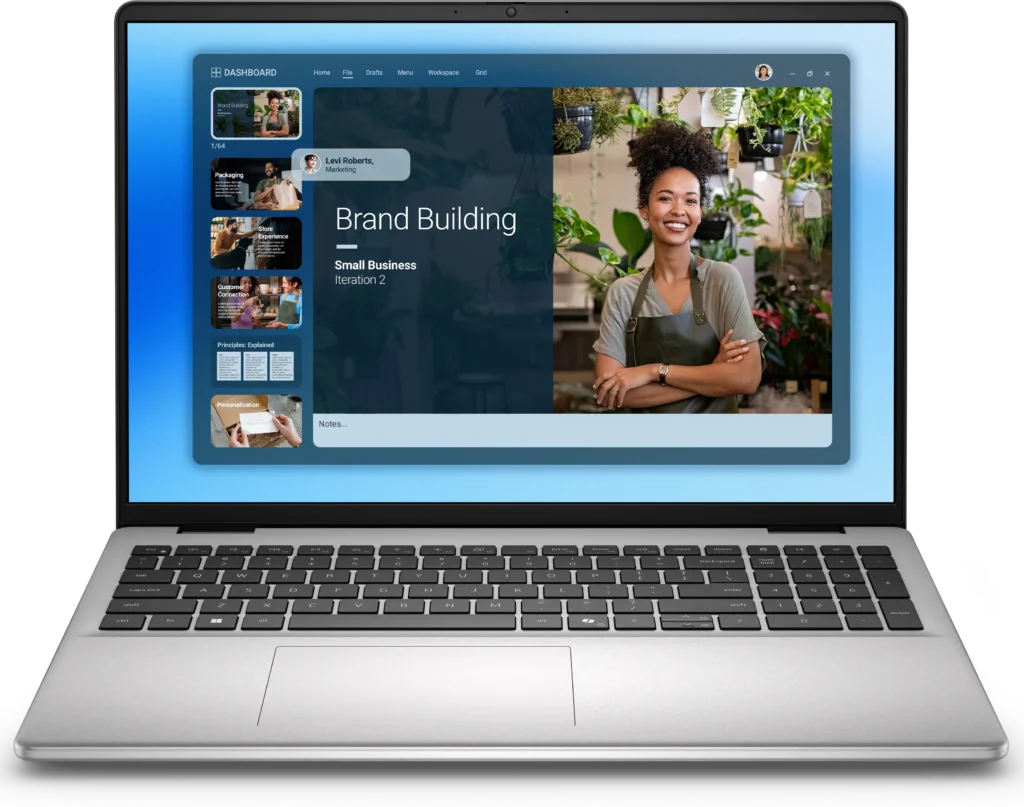
The 16-inch display with 2K resolution (1920 x 1200) in a 16:10 aspect ratio is genuinely one of the best features of this laptop. The extra vertical space compared to 16:9 displays helps significantly with productivity work – documents, spreadsheets, and web browsing all benefit from the additional screen real estate.
The 1920 x 1200 resolution provides sharp text and adequate detail for productivity tasks. It’s not as high-resolution as premium laptops, but for a 16-inch display at this price, it’s perfectly acceptable.
The IPS/WVA panel delivers decent viewing angles and reasonable colour reproduction for everyday work and media consumption. The 300 nits brightness is adequate for indoor office use but struggles in brightly lit environments or outdoors. The anti-glare coating helps reduce reflections during everyday use.
Dell’s ComfortView technology reduces blue light emissions to minimize eye strain during extended use, which is genuinely useful for professionals spending long hours staring at screens.
The display isn’t calibrated or colour-accurate enough for creative work, but for business productivity, document editing, and general computing, it delivers solid performance. The 16:10 aspect ratio alone makes this display significantly more useful than standard 16:9 panels for office work.
Performance
The Intel Core 7 150U with 10 cores (up to 5.4 GHz) provides capable performance for everyday productivity tasks. This is Intel’s mid-range processor designed for thin-and-light laptops, prioritizing efficiency over raw power.
For typical workloads – Microsoft Office, web browsing, email, video calls, document editing, and moderate multitasking – the Core 7 150U handles everything smoothly. It’s not as powerful as H-series processors in gaming laptops or workstations, but for business productivity, it’s perfectly adequate.
The 16GB of DDR5-5200 RAM in dual-channel configuration (2 x 8GB) provides good memory bandwidth and adequate capacity for multitasking. Having proper dual-channel configuration is crucial – we’ve seen how single-channel RAM cripples performance in laptops like the HP Victus 15. Dell got this right.
The 1TB SSD is genuinely generous at this price point. Many budget laptops ship with just 512GB, forcing users to manage storage carefully or upgrade immediately. Having 1TB out of the box provides ample space for documents, photos, applications, and files without constant storage anxiety.
The Intel integrated graphics handle basic tasks – video playback, light photo editing, and simple graphics work. Don’t expect gaming beyond very casual titles or older games on low settings.
For business productivity and everyday computing, the Core 7 150U with 16GB dual-channel RAM delivers smooth, responsive performance. Just don’t expect it to handle intensive creative work or gaming.
Thermal Performance – The Critical Flaw
Here’s where the Dell 16 DC16251 stumbles badly: the laptop heats up and gets very noisy under load. This isn’t a minor inconvenience – it’s a fundamental design flaw that impacts daily usability.
During sustained workloads – video calls, multitasking, or any moderately intensive tasks – the laptop gets noticeably hot, particularly on the bottom panel and around the keyboard area. The cooling system struggles to manage heat effectively, likely due to cost-cutting on thermal design.
Worse, the fans become very noisy when working to dissipate heat. This isn’t subtle background noise – it’s loud enough to be distracting in quiet office environments or during video calls. The fan noise becomes particularly problematic during Zoom meetings or presentations where you need a quiet laptop.
For light productivity work with minimal CPU load, thermals are manageable. But push the laptop with multitasking, sustained work, or even just running video calls for extended periods, and you’ll experience both heat and excessive fan noise.
This thermal limitation significantly undermines the laptop’s usability for professional environments where quiet operation matters. It’s one of the most serious compromises Dell made to hit the $997.70 price point.
Keyboard and Trackpad
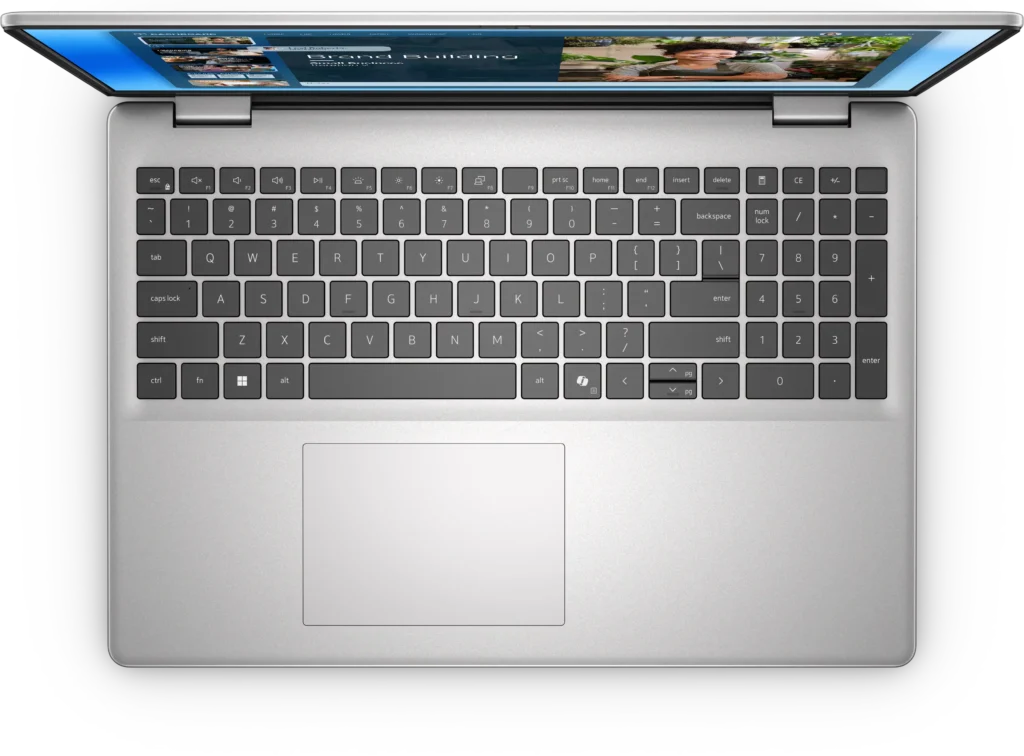
The backlit keyboard with numeric keypad provides a full-size layout suitable for productivity work. The Carbon Black keycaps contrast nicely with the Platinum Silver chassis, and the backlighting provides visibility in low-light conditions.
The keyboard includes the new Copilot key for Windows 11’s AI assistant, which is becoming standard on modern Windows laptops.
Key travel and tactile feedback should be adequate for extended typing sessions, though the keyboard deck flex might be noticeable during heavy typing due to the plastic construction.
The precision touchpad supports multi-touch gestures and should provide smooth tracking for everyday navigation.
Ports and Connectivity – Mixed Bag
The port selection is adequate but shows some concerning limitations:
- 2x USB-A 3.2 Gen 1 (5Gbps)
- 1x USB-C 3.2 Gen 2 (10Gbps, Power Delivery, DisplayPort 1.4)
- HDMI 1.4 (not 2.1)
- SD card reader
- 3.5mm audio jack
- Power jack
- Kensington lock slot
Having an SD card reader is genuinely useful for photographers or anyone transferring files from cameras. The USB-C port with Power Delivery and DisplayPort support enables external monitor connectivity.
However, there are significant limitations:
HDMI 1.4 is dated for a laptop released in 2025. HDMI 2.1 has been standard on newer laptops, supporting higher refresh rates and resolutions. HDMI 1.4 limits you to 4K/30Hz, which feels restrictive for modern displays.
The Realtek Wi-Fi 6E RTL8852CE wireless card is a major compromise. Dell cut costs by using Realtek rather than Intel Wi-Fi, which typically delivers better performance and reliability. The Realtek card potentially limits download speeds, particularly on faster internet connections. For users with gigabit internet or high-speed Wi-Fi, this wireless card becomes a bottleneck.
This is frustrating because wireless performance impacts daily usability significantly. Slow downloads, dropped connections, or inconsistent performance all stem from this cost-cutting decision.
Bluetooth connectivity handles wireless peripherals adequately.
Audio and Webcam
The dual speakers deliver dull, disappointing audio. Sound quality is thin with minimal bass response – typical for budget laptop speakers but still frustrating for media consumption or video calls.
For any serious audio work, video watching, or even just background music, you’ll want headphones or external speakers. The built-in speakers are adequate for system sounds and emergency video calls, but not much else.
The 1080p FHD webcam with dual digital microphones and temporal noise reduction provides decent video call quality. Having 1080p rather than 720p is genuinely better for remote work and video conferencing. The dual microphones with noise reduction help with audio quality during calls.
Battery Life – Another Weakness
The 54Wh battery is disappointingly small for a 16-inch laptop. For context:
- This Dell 16: 54Wh
- Typical 14-inch laptops: 50-60Wh
- Typical 16-inch laptops: 70-90Wh
- LG Gram 17: 77Wh
Having essentially a 14-inch laptop battery in a 16-inch chassis means battery life will be compromised.
Expected battery life:
- Light productivity use: 4-6 hours
- Mixed usage: 2-5 hours
- Video streaming: 3-5 hours
For a 16-inch laptop targeting professionals and students, this battery life is inadequate. You’ll need to stay near power outlets throughout the day, which undermines the portability that the 1.98kg weight might otherwise provide.
The 65W AC adapter provides adequate charging, though some competitors offer faster charging solutions.
The Wi-Fi Card Issue
It’s worth emphasizing the Realtek Wi-Fi limitation because it impacts daily usability significantly. As of late 2025, with many Aussies now having access to recent speed updates on NBN plans (500Mbps, 250Mbps, or even gigabit connections), having a wireless card that potentially bottlenecks your internet speed is super frustrating.
Intel’s Wi-Fi cards typically deliver better performance, reliability, and driver support compared to Realtek alternatives. Dell chose Realtek to cut costs, and users pay the price with potentially slower download speeds, less stable connections, and inferior performance.
For students downloading large files, professionals on video calls, or anyone who relies on fast internet connectivity, this wireless card limitation is a significant compromise.
Warranty and Support
Dell includes 12-month onsite service after remote diagnosis with hardware-only support, which is decent for a budget laptop. If hardware fails, Dell will send a technician to your location for repairs after diagnosing the issue remotely.
Value Comparison
At $997.70, how does this compare?
Lenovo ThinkBook 16 G8: $1,097-1,149 with better build quality but terrible display (45% NTSC) and tiny 45Wh battery
ASUS V16: $1,399 with RTX 4050 GPU, 144Hz display, better build quality – more expensive but significantly better specs
HP laptops in this range: Similar compromises with varying strengths/weaknesses
The Dell 16 represents solid value if you can accept the thermal issues, poor Wi-Fi, and weak battery. At under $1,000 for a 16-inch laptop with 16GB dual-channel RAM and 1TB storage, it’s genuinely affordable. But the compromises are real and impact daily usability.
Pros:
- Exceptional price at $997.70 for 16-inch laptop
- 16-inch 2K display (1920×1200) with 16:10 aspect ratio
- 1TB storage genuinely generous at this price
- 16GB dual-channel DDR5 RAM (proper configuration)
- Backlit keyboard with numeric keypad
- Fingerprint reader integrated into power button
- SD card reader included
- 1080p webcam better than 720p
- Lightweight at 1.98kg for 16-inch laptop
- 12-month onsite warranty after remote diagnosis
- USB-C with Power Delivery and DisplayPort support
- ComfortView blue light reduction
- Copilot key for Windows 11
Cons:
- Gets hot and very noisy under load – major usability issue
- Realtek Wi-Fi limits download speeds vs Intel alternatives
- Dull, disappointing audio quality
- Small 54Wh battery for 16-inch laptop – poor battery life
- Only HDMI 1.4 (not 2.1) limits external display options
- Plastic build feels budget-grade
- Noticeable chassis and keyboard deck flex
- Only 65W charger (competitors offer faster charging)
- Windows 11 Home (not Pro)
- Energy Star 8.0/9.0 and EPEAT Silver (not Gold) certifications
Final Verdict
The Dell 16 DC16251 is a budget 16-inch laptop that delivers impressive specs at an exceptional price, but makes serious compromises that impact daily usability. At $997.70, you’re getting a 16-inch 2K display, 16GB dual-channel RAM, and a generous 1TB SSD – specs that would typically cost $1,400-1,600 from competitors.
However, the thermal issues are genuinely concerning. A laptop that gets hot and very noisy under load is frustrating to use in professional environments, during video calls, or in quiet spaces like libraries. The poor Wi-Fi performance compounds the problem for users with fast internet connections, and the dull audio means you’ll need headphones for any serious media consumption.
The 54Wh battery is inadequate for a 16-inch laptop, forcing you to stay near power outlets throughout the day. Combined with the thermal and noise issues, this laptop feels like it’s constantly struggling rather than working smoothly.
Who should buy this:
- Extreme budget-conscious users needing 16-inch screen
- Students who can tolerate noise and heat for the low price
- Users who primarily work plugged in at desks
- Anyone who values 1TB storage and can accept compromises
- Users with slower internet (where Wi-Fi limitation matters less)
Who should avoid this:
- Professionals needing quiet operation for video calls
- Anyone with fast internet (Wi-Fi will bottleneck)
- Mobile workers needing good battery life
- Users who value build quality and premium feel
- Anyone sensitive to fan noise
Better alternatives (if budget allows):
- ASUS V16: $1,399 with RTX 4050, 144Hz display, better thermals
- Lenovo IdeaPad Slim: Better build quality, quieter operation
- Wait for sales: Premium laptops often drop to $1,200-1,400 range
At $997.70, the Dell 16 DC16251 delivers impressive specs on paper, but the thermal issues, poor Wi-Fi, weak battery, and dull audio significantly compromise the actual user experience. If you’re extremely price-sensitive and can tolerate heat, noise, and limited battery life, the generous specs make it worth considering.
However, for most users, I’d recommend saving an extra $200-400 for a laptop that doesn’t constantly fight against its own thermal limitations. The difference between a laptop that gets hot and noisy versus one that runs cool and quiet is massive in daily use. That fan noise during video calls, that heat on your lap, those slow Wi-Fi downloads – they add up to frustration over time.
If this is your only option at this price point and you need 16 inches immediately, buy it with eyes wide open about the compromises. But if you can stretch your budget or wait for sales on better laptops, you’ll have a far more satisfying experience with something that doesn’t constantly remind you of the corners Dell cut to hit $997.70.
The value is there on paper. The experience is compromised in practice. Choose accordingly based on your priorities and budget constraints.