Two-in-one laptops occupy an interesting space in the market. They promise versatility – use it as a traditional laptop for productivity, flip it into tablet mode for reading or drawing, or prop it up in tent mode for watching videos. But this flexibility often comes with compromises. The 360-degree hinge adds weight and complexity, touchscreens drain batteries faster, and you’re paying extra for features you might not use regularly.
Dell’s Inspiron line has long been the brand’s mainstream consumer offering, sitting between the budget models and the premium XPS series. The Inspiron 14 7445 2-in-1 aims to deliver that convertible versatility without the premium price tag, targeting students, creative professionals, and anyone who values flexibility in how they use their laptop.
At $948.20 direct from Dell, the Inspiron 14 7445 2-in-1 packs some impressive features: an aluminium chassis, recent AMD Ryzen 5 processor, 16GB of dual-channel RAM, a touchscreen, and perhaps most notably, an included Dell Active Pen. That last bit is significant – many cheaper 2-in-1 laptops charge extra for stylus support, so having one in the box adds genuine value.
But does the Dell Inspiron 14 7445 2-in-1 deliver a cohesive experience, or do the compromises inherent in convertible designs drag it down? Let’s find out.

Pros
- Aluminium chassis feels premium
- Includes Dell Active Pen in the box
- Dual-channel 16GB DDR5 RAM
- Backlit keyboard with Copilot key
- 1080p FHD webcam
Cons
- Trackpad feels stiff and less responsive
- 300 nits brightness struggles outdoors
- 54WHr battery is modest for 14-inch
- Heavier than non-convertible 14-inch laptops
Key Specifications
- Display: 14″ FHD+ (1920 x 1200), Touch, WVA, 300 nits, ComfortView
- Processor: AMD Ryzen 5 8640HS (6 cores, 12 threads with Radeon Graphics)
- Memory: 16 GB DDR5-5600 (2 x 8 GB, dual-channel)
- Storage: 512 GB PCIe NVMe SSD
- Graphics: AMD Radeon Graphics (integrated)
- Operating System: Windows 11 Home
- Wireless: Wi-Fi 6E, Bluetooth
- Battery: 54 WHr, 4-cell integrated
- Ports: 2x USB-C 3.2 Gen 2 (10 Gbps, Power Delivery, DisplayPort 1.4), 2x USB-A 3.2 Gen 1, HDMI 1.4, headphone/mic combo, SD card slot
- Keyboard: Backlit with Copilot key, no numeric keypad
- Camera: 1080p FHD with dual microphones
- Stylus: Dell Active Pen PN5122W included
- Security: Fingerprint reader
- Weight: Starting at 1.71 kg
- Dimensions: 314.00 x 226.15 x 15.86-18.90 mm
- Chassis: Aluminium (Midnight Blue)
- Power: 65W USB-C adapter
- Warranty: 1 year basic onsite service after remote diagnosis
- Price: Available from Dell for $948.20
Design and Build Quality
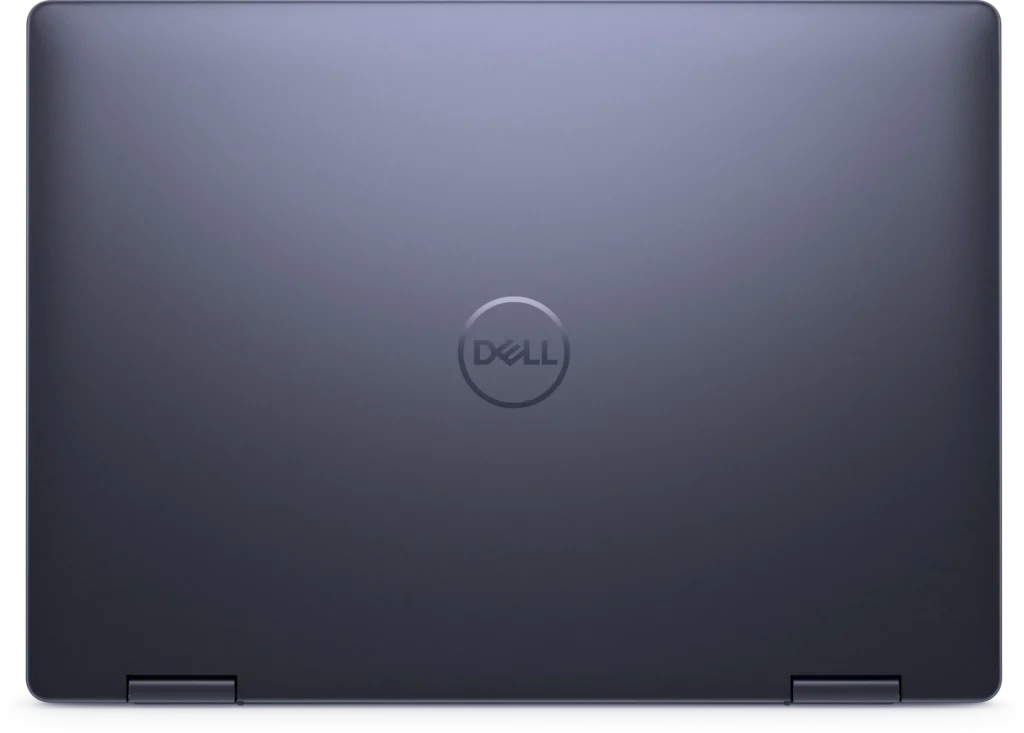
The Dell Inspiron 14 7445 2-in-1 immediately feels more premium than Dell’s budget offerings. The aluminium chassis in Midnight Blue has a quality heft to it, and there’s far less flex than you’d find in plastic laptops. The metal construction doesn’t just look better – it feels more durable and inspires confidence for daily use.
At 1.71 kg, it’s noticeably heavier than non-convertible 14-inch ultraportables, but that’s the trade-off for the 360-degree hinge mechanism and touchscreen. It’s still portable enough to carry around campus or commute with, though you’ll definitely feel the weight in your bag.
The 360-degree hinge feels solid and well-engineered. It’s stiff enough to hold the screen in any position – laptop mode, tablet mode, tent mode, or stand mode – without wobbling or slowly collapsing. The hinge mechanism adds thickness (15.86-18.90mm), making it chunkier than traditional laptops, but that’s unavoidable with convertible designs.
The Midnight Blue colour looks sophisticated and professional, avoiding the gamer aesthetic while still standing out from the sea of silver and grey laptops. The fingerprint reader is integrated into the power button, providing convenient biometric login without taking up extra space.
Build quality feels robust for a mid-range device. The aluminium chassis doesn’t creak or flex like cheaper plastic alternatives, and the overall construction suggests this laptop can handle being carried around daily without falling apart.
Display
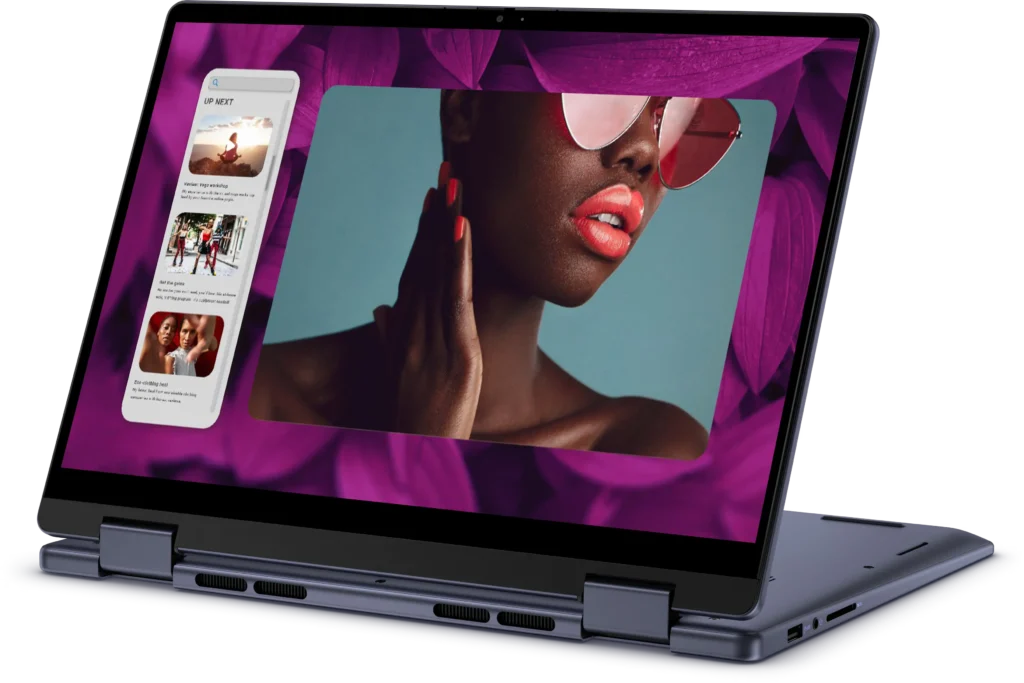
The 14-inch FHD+ touchscreen uses a WVA (Wide Viewing Angle) panel, which is essentially Dell’s branding for IPS-type technology. The 1920 x 1200 resolution provides extra vertical space compared to standard 1920 x 1080 displays, which is particularly useful for productivity work – documents, spreadsheets, and web browsing all benefit from that additional screen real estate.
Touch responsiveness is excellent, with the capacitive touchscreen responding accurately to taps, swipes, and multi-touch gestures. The included Dell Active Pen PN5122W adds stylus functionality, which is genuinely useful for note-taking, sketching, or marking up documents. Having the pen included rather than sold separately is a significant value-add—active styluses typically cost $50-100 on their own.
The ComfortView feature refers to Dell’s low blue light technology, which reduces eye strain during extended use. It’s implemented in software rather than hardware, so you can toggle it on and off as needed.
However, brightness is a limitation. At 300 nits, the display is brighter than the 250-nit panels we’ve seen on budget laptops, but it’s still not ideal for outdoor use or brightly lit environments. Working near windows can be challenging, and using this laptop outside in direct sunlight is basically off the table. For indoor use, though, 300 nits is perfectly adequate.
Colour reproduction is decent for a mid-range laptop – colours look vibrant enough for everyday use, though it’s not colour-accurate enough for professional photo or video editing. Viewing angles are good thanks to the IPS-type panel, which is important for a 2-in-1 where you’ll be viewing the screen from various angles depending on how it’s positioned.
The 16:10 aspect ratio (implied by the FHD+ resolution) is a welcome change from the old 16:9 standard, providing more vertical workspace without making the laptop wider.
Performance
The AMD Ryzen 5 8640HS is a capable mid-range processor from AMD’s 2024 lineup. With 6 cores and 12 threads, it handles everyday computing comfortably – web browsing, document editing, video streaming, and moderate multitasking all run smoothly. The “HS” designation indicates it’s a power-efficient variant designed for thin-and-light laptops, balancing performance with battery life.
The 16GB of DDR5-5600 RAM in dual-channel configuration (2 x 8GB) is a significant advantage over single-channel setups. This provides excellent memory bandwidth, which benefits both the CPU and integrated graphics. Multitasking feels snappy, with the laptop handling multiple browser tabs, Office applications, and background programs without noticeable slowdowns.
The integrated AMD Radeon Graphics are more capable than basic Intel integrated graphics, handling light gaming and creative tasks reasonably well. You can play older titles or esports games on lower settings, and photo editing in programs like Lightroom or Photoshop is feasible for hobbyist use. Don’t expect to play modern AAA titles or do heavy video rendering, but for light creative work, it’s adequate.
The 512GB PCIe NVMe SSD provides decent storage and quick performance. Boot times are fast, applications load rapidly, and there’s enough space for most users’ documents, photos, and programs. If you need more storage, the M.2 slot should allow for upgrades.
Thermal management seems reasonable for a thin convertible. The laptop gets warm under sustained load, particularly around the hinge area, but it doesn’t reach uncomfortable temperatures. Fan noise is present during intensive tasks but remains relatively quiet during everyday computing.
Keyboard and Trackpad
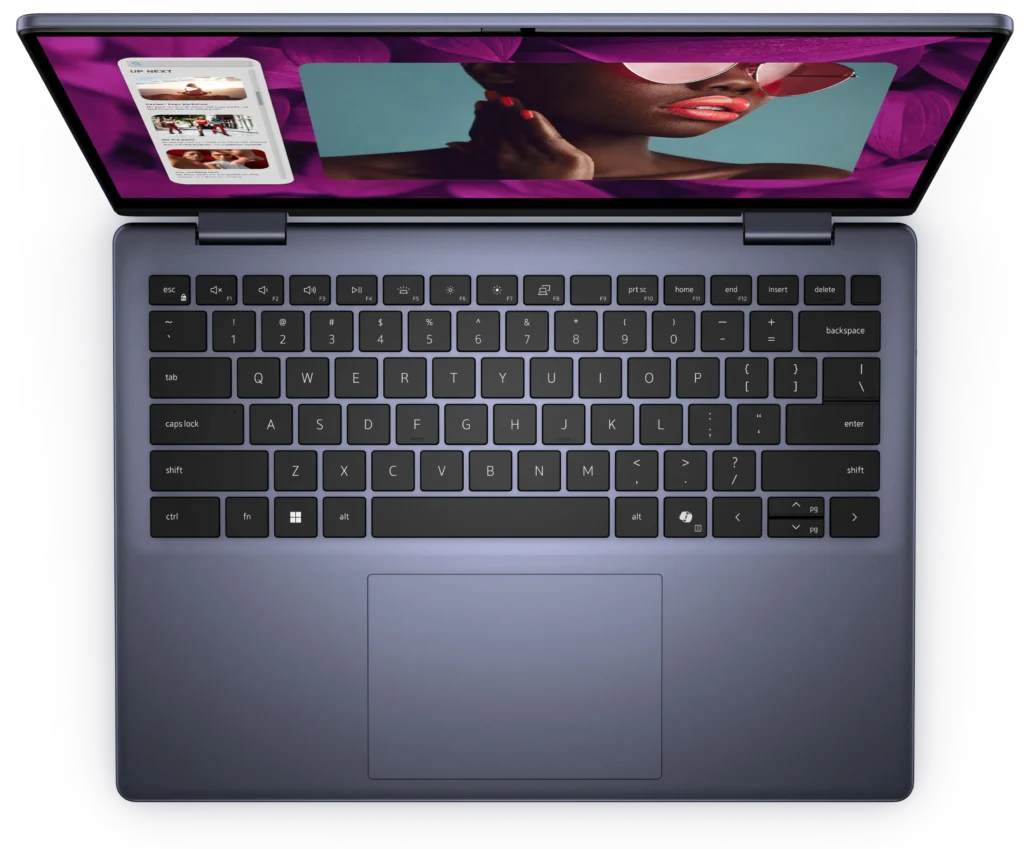
The backlit keyboard is a highlight of the Inspiron 14 7445 2-in-1. Key travel is decent, tactile feedback is satisfying, and the overall typing experience is comfortable for extended sessions. The backlighting is useful for working in dim conditions, and the inclusion of a dedicated Copilot key shows Dell’s commitment to Windows 11’s AI features.
The keyboard layout omits the numeric keypad, which makes sense on a 14-inch laptop – it keeps the main keyboard centred and avoids the cramped feeling you get when manufacturers try to squeeze a numpad onto smaller laptops.
However, the trackpad is where things get disappointing. It feels noticeably stiff, requiring more pressure than it should to register clicks. The precision touchpad supports multi-touch gestures, and tracking is accurate, but the stiff click mechanism makes it less pleasant to use than it should be. For a laptop at this price point, the trackpad should feel smoother and more responsive.
This isn’t a deal-breaker – you can adjust to the stiff trackpad over time, or use tap-to-click instead of pressing down – but it’s a noticeable flaw that detracts from an otherwise solid input experience.
2-in-1 Functionality
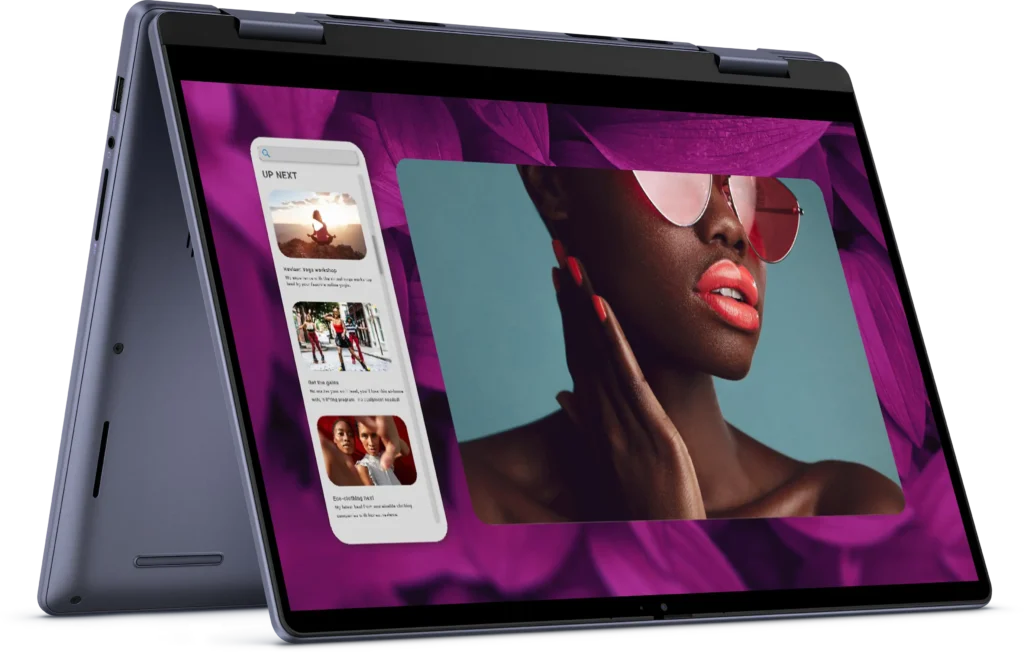
The 360-degree hinge works smoothly, allowing you to flip the laptop into various modes:
- Laptop mode for traditional productivity work
- Tablet mode with the keyboard folded back for reading, drawing, or touch-based apps
- Tent mode for watching videos on a desk or table
- Stand mode for presentations or sharing the screen with others
The included Dell Active Pen PN5122W is a genuine active stylus with pressure sensitivity, making it useful for note-taking, sketching, and marking up documents. It’s not as advanced as Microsoft’s Surface Pen or Apple Pencil, but for students taking handwritten notes or professionals annotating PDFs, it’s perfectly functional.
At 1.71 kg, using this laptop in tablet mode for extended periods isn’t particularly comfortable – it’s heavy enough that your arms will tire. It’s better suited for propping up in stand or tent mode rather than holding like a tablet. For occasional tablet use, though, it works fine.
Ports and Connectivity
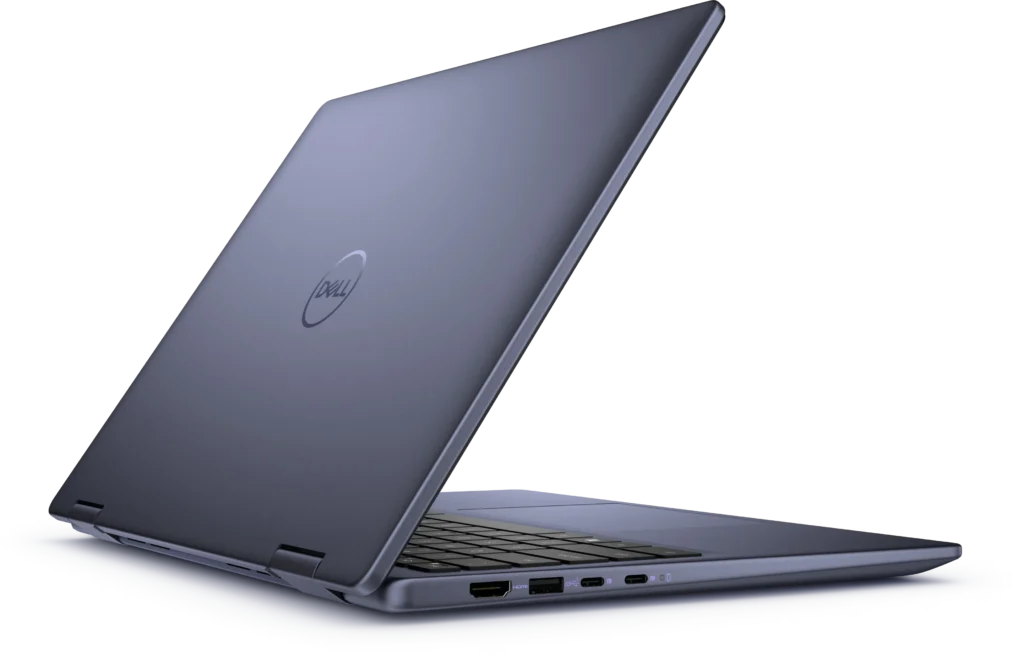
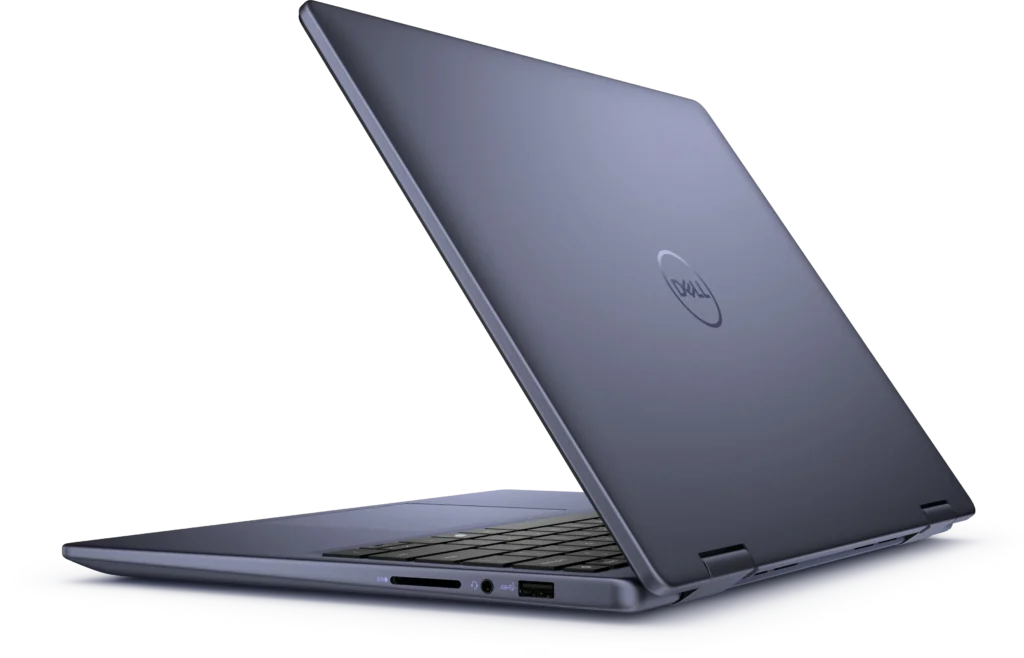
The port selection is solid for a mid-range 2-in-1:
- 2x USB-C 3.2 Gen 2 (10 Gbps) with Power Delivery and DisplayPort 1.4
- 2x USB-A 3.2 Gen 1
- 1x HDMI 1.4
- 1x SD card reader
- 1x headphone/microphone combo jack
Having two USB-C ports with Power Delivery means you can charge from either side, which is convenient. The DisplayPort support over USB-C allows for connecting modern monitors with a single cable.
However, the HDMI 1.4 port is limited to 1920×1080 @60Hz output, which means you can’t output 4K or 2K resolutions through HDMI. This is disappointing for a 2025 laptop – HDMI 2.0 should be the minimum standard. If you want higher-resolution external displays, you’ll need to use the USB-C DisplayPort output.
The SD card reader is handy for photographers or anyone regularly transferring files from cameras or other devices.
Wi-Fi 6E provides fast wireless connectivity with support for the 6GHz band, ensuring good performance on compatible routers.
Audio and Webcam
The dual speakers with Dolby Atmos Core and Waves MaxxAudio Pro processing deliver decent audio for a laptop this size. Sound is clearer and fuller than budget laptops, with reasonable volume and some bass presence. They’re fine for video calls, YouTube videos, and casual media consumption, though serious music listening or movie watching still benefits from headphones or external speakers.
The 1080p FHD webcam is a significant upgrade over the 720p cameras found on most laptops. Image quality is noticeably better for video calls, with improved clarity and detail. The dual microphone array with temporal noise reduction helps ensure your voice comes through clearly during meetings. For anyone doing regular video calls, the upgraded webcam is a genuine benefit.

Battery Life
The 54WHr battery is modest for a 14-inch convertible, and it shows in real-world use. With mixed usage – web browsing, document editing, some video streaming – you’re looking at around 6-7 hours before needing to plug in. That’s enough for a typical workday or school day, but not quite all-day endurance.
The touchscreen and higher-resolution display drain more power than non-touch laptops, which contributes to the modest battery life. If you’re doing more intensive tasks or using the laptop in tablet or tent mode (where the screen brightness often needs to be higher), expect battery life to drop to 4-5 hours.
The 65W USB-C charger recharges the battery reasonably quickly, and being able to charge via USB-C means you could potentially use compatible third-party chargers or power banks in a pinch.
For a 2-in-1 with these features, the battery life is acceptable but not exceptional. You’ll want to bring the charger along for longer days.
Pros:
- Premium aluminium chassis feels solid and durable
- Includes Dell Active Pen PN5122W in the box – genuine added value
- 16GB DDR5 RAM in dual-channel configuration delivers good performance
- Backlit keyboard with comfortable typing experience
- 1080p FHD webcam significantly better than 720p alternatives
- USB-C charging with Power Delivery from either port
- Fingerprint reader for convenient security
- 360-degree hinge works smoothly for multiple usage modes
- FHD+ (1920×1200) resolution provides extra vertical space
- Wi-Fi 6E for modern wireless connectivity
- Decent audio quality with Dolby Atmos processing
- Good port selection including SD card reader
Cons:
- Trackpad feels stiff and requires more pressure than it should
- 300 nits brightness struggles in bright environments and outdoors
- HDMI 1.4 limited to 1080p@60Hz output – no 4K support
- 54WHr battery provides only modest endurance
- At 1.71 kg, heavier than non-convertible 14-inch laptops
- Uncomfortable to hold as a tablet for extended periods due to weight
My Final Verdict
The Dell Inspiron 14 7445 2-in-1 is a solid mid-range convertible that delivers genuine versatility without asking for premium prices. At $948.20, it offers good value – the aluminium construction feels quality, the included stylus adds genuine functionality, and the dual-channel 16GB DDR5 RAM ensures smooth performance for everyday computing.
The 2-in-1 design works well for students who want to take handwritten notes with the included pen, professionals who occasionally need to present or annotate documents, or anyone who values having multiple usage modes. The 360-degree hinge is well-engineered, and the touchscreen responds accurately.
However, the stiff trackpad is a genuine annoyance that you’ll encounter every time you use this laptop in traditional mode. It’s not a deal-breaker, but it’s disappointing that Dell didn’t nail such a fundamental input method. The 300 nits of brightness is adequate for indoor use but limits outdoor usability, and the HDMI 1.4 limitation feels outdated for a laptop released in this era.
For students, creative hobbyists, or professionals who value flexibility and don’t mind the extra weight of a convertible design, the Inspiron 14 7445 2-in-1 represents solid value. The included pen, 1080p webcam, and aluminium build set it apart from cheaper alternatives.
For those who don’t need 2-in-1 functionality, you might find better value in traditional laptops like the Lenovo IdeaPad Slim 5 or ASUS VivoBook 15, which offer similar performance with better trackpads and potentially better displays for around the same money. But if you specifically want a convertible with stylus support, this Dell delivers.
At just under $950, the Inspiron 14 7445 2-in-1 strikes a reasonable balance between features, build quality, and price. Just be prepared to work around the stiff trackpad, and maybe keep the charger handy for longer days. The versatility of the 2-in-1 design and included pen make it worth considering if those features align with how you work.