Business Laptop Balancing Value and Compromises
The business laptop market is fiercely competitive. Companies and professionals need reliable machines that handle productivity work efficiently, offer proper security features, and survive daily office life – all without breaking IT budgets. Lenovo’s ThinkBook series has carved out a niche in this space, sitting between the consumer-focused IdeaPad line and the premium enterprise ThinkPad series.
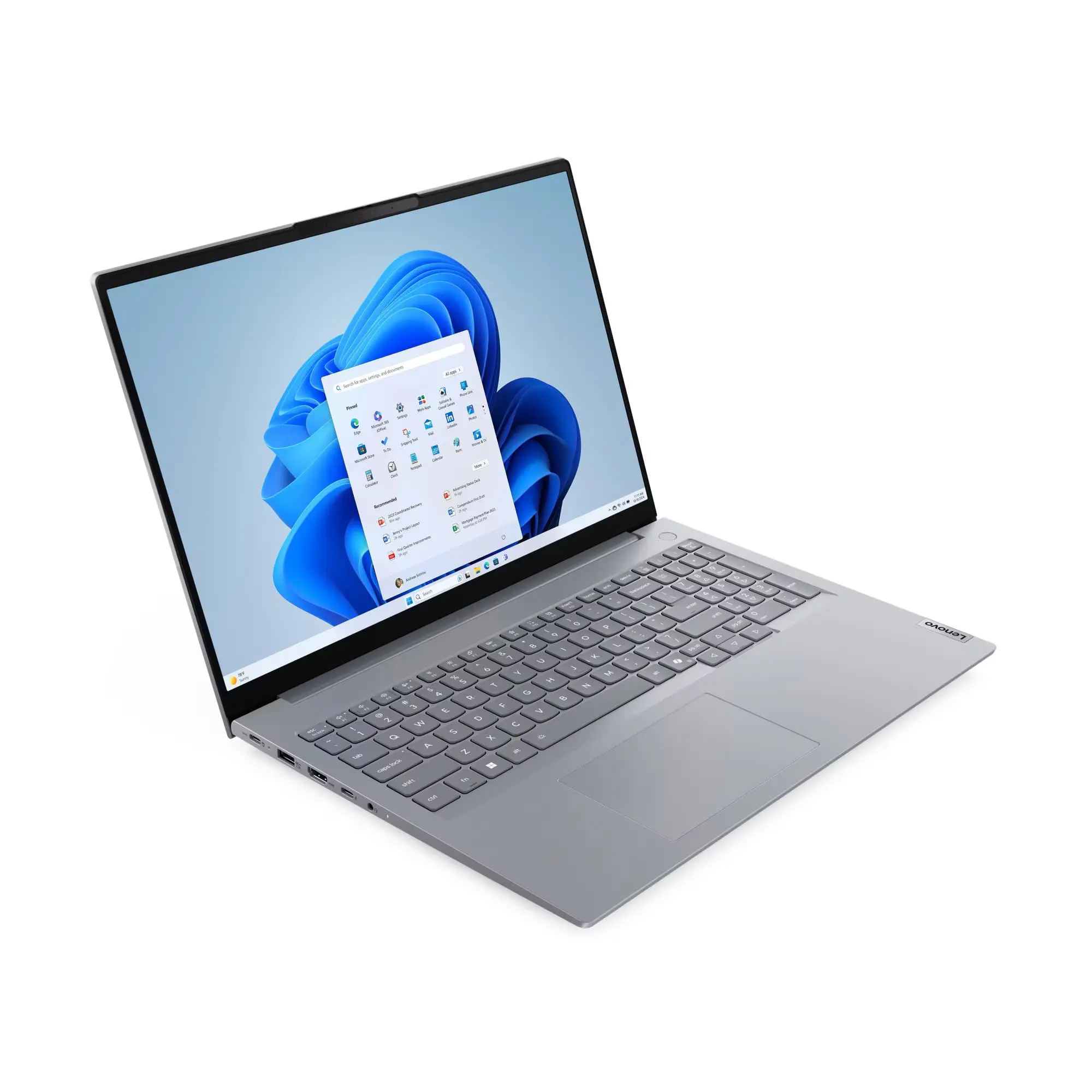
The ThinkBook 16 G8 targets small businesses, professionals, and students who need a larger 16-inch display for productivity work but can’t justify ThinkPad prices. With Windows 11 Pro, a 1080p IR camera with Windows Hello, fingerprint reader, and MIL-STD-810H durability certification, it’s trying to deliver business-class features at an accessible price point.
At prices ranging from $1,097 (Umart) to $1,149 (Scorptec, Computer Alliance), with Amazon splitting the difference at $1,099, the ThinkBook 16 G8 is genuinely affordable for a 16-inch business laptop. But to hit these prices, Lenovo has made some significant compromises. The question is whether those trade-offs are acceptable for the target market. Let’s dig in.
Pros
- Excellent price
- Windows 11 Pro included
- Gigabit Ethernet included
Cons
- Very poor display
- Tiny 45Wh battery for 16" laptop
- Plastic bottom undermines build quality
Key Specifications
- Display: 16″ WUXGA (1920 x 1200), IPS, 300 nits, 45% NTSC (~62% sRGB), 60Hz, anti-glare
- Processor: Intel Core 5 210H (8 cores: 4P + 4E, 12 threads, P-cores up to 4.8 GHz, E-cores up to 3.6 GHz, 12MB cache)
- Memory: 16 GB DDR5-5600 (2 x 8 GB, dual-channel, upgradable to 64GB)
- Storage: 512 GB PCIe 4.0 NVMe SSD (M.2 2242)
- Graphics: Intel integrated graphics
- Operating System: Windows 11 Pro
- Wireless: Wi-Fi 6E (802.11ax 2×2), Bluetooth 5.3, Gigabit Ethernet (10/100/1000)
- Battery: 45 Wh
- Ports: 2x USB-A (5Gbps, one Always On), 1x USB-C (10Gbps, PD 3.0, DisplayPort 1.4), 1x Thunderbolt 4 (40Gbps, PD 3.0, DisplayPort 2.1), HDMI 2.1 (4K/60Hz), Ethernet (RJ-45), SD card reader, 3.5mm combo audio jack
- Keyboard: Backlit, English
- Touchpad: Precision touchpad (75 x 120mm)
- Camera: 1080p FHD + IR with privacy shutter (Windows Hello facial recognition)
- Audio: Stereo speakers (2W x2) with Dolby Audio, Realtek ALC3287 codec
- Weight: Starting at 1.7 kg
- Dimensions: 356 x 253.5 x 17.5 mm
- Build: Aluminum top (anodized sandblasting), plastic bottom
- Colour: Arctic Grey
- Power: 65W USB-C adapter
- Security: Firmware TPM 2.0, fingerprint reader (integrated in power button), IR camera, camera privacy shutter, Kensington Nano Security Slot
- Screen-to-body ratio: 90%
- Certifications: Energy Star 9.0, EPEAT Gold, MIL-STD-810H, TCO Certified Gen 10, TÜV Low Blue Light
- Price: Umart $1,097, Amazon $1,099, Scorptec/Computer Alliance $1,149
Note on Configurations
There are many different configurations of the ThinkBook 16 G8 available with various processors (Intel Core 5, Core 7, Core Ultra series), RAM amounts, and storage options. This review covers the base Intel Core 5 210H model with 16GB RAM and 512GB storage (Model part number: 21SH000LAU), which represents the entry point into the lineup.
Design and Build Quality

The ThinkBook 16 G8 follows Lenovo’s business-focused design language – understated, professional, and functional. The Arctic Grey colour scheme looks appropriate for office environments, and the overall aesthetic won’t draw unwanted attention in professional settings.
However, the build quality could be better. While the top cover uses aluminium with anodized sandblasting treatment (which feels quality), the bottom chassis is plastic (PC-ABS) with texture treatment. This mixed-material approach is clearly cost-cutting – at $1,097-1,149, Lenovo couldn’t afford full aluminium construction.
Pick up the laptop and the plastic bottom is immediately noticeable. There’s some flex in the chassis, particularly around the keyboard deck, reminding you this isn’t a premium ThinkPad. For a business laptop targeting professionals, the plastic construction feels disappointing.
That said, at 1.7kg for a 16-inch laptop, is decent. Most budget 16-inch laptops weigh more than this, making the ThinkBook’s portability a genuine advantage for mobile professionals. The 17.5mm thickness is slim enough to slip into bags easily.
Lenovo has put this through MIL-STD-810H military-grade testing, suggesting it can handle drops, temperature extremes, and daily office abuse. This durability certification adds genuine value, especially for laptops that travel between home and office daily.
The 90% screen-to-body ratio means Lenovo has minimized bezels reasonably well, giving it a modern appearance despite the budget construction.
Display – The Major Weakness

Here’s where the ThinkBook 16 G8 stumbles badly. The 16-inch WUXGA (1920 x 1200) display uses an IPS panel with just 45% NTSC colour coverage – that translates to roughly 62% sRGB, which is genuinely poor for any laptop, let alone a 16-inch business machine in 2025.
For context on colour gamut:
- This ThinkBook: 45% NTSC (~62% sRGB)
- Budget laptops: 45-65% sRGB
- Decent mid-range laptops: 90-100% sRGB
- Premium laptops: 100% sRGB or DCI-P3
The ThinkBook’s display sits at the absolute bottom end of acceptable—colours look washed out, dull, and lifeless. For anyone doing creative work requiring colour accuracy, this is completely unsuitable. Even for general office work, the lack of colour vibrancy is noticeable and disappointing.
The 300 nits brightness is adequate for indoor office use but struggles in bright environments or near windows. The anti-glare coating helps reduce reflections somewhat.
The 60Hz refresh rate is standard for business laptops but feels dated compared to 90Hz or 120Hz+ displays becoming common even on mid-range laptops.
The 1920 x 1200 resolution provides extra vertical space compared to 16:9 displays, which helps with document work and spreadsheets. Text appears reasonably sharp at this resolution for a 16-inch panel.
The IPS technology provides decent viewing angles, so you won’t see massive colour shifts when viewing off-axis. But with such limited colour coverage, the viewing angles matter less – the colours look bad from any angle.
This display is genuinely one of the worst aspects of the ThinkBook 16 G8. For a 16-inch business laptop where the large screen is presumably a selling point, having such poor colour reproduction is a significant flaw. You’ll be staring at this washed-out display every time you use the laptop, which impacts the overall experience dramatically.
Performance
The Intel Core 5 210H is from Intel’s newer budget H-series lineup with 8 cores (4 performance + 4 efficiency cores) and 12 threads. The P-cores boost up to 4.8 GHz while E-cores reach 3.6 GHz, with 12MB of cache.
For business productivity tasks – Microsoft Office, email, web browsing, video calls, and moderate multitasking – the Core 5 210H handles things adequately. It’s not as powerful as Core 7 or Core Ultra processors, but it’s sufficient for typical office workloads.
The 16GB of DDR5-5600 RAM in dual-channel configuration (2 x 8GB) provides decent memory bandwidth. Having two SODIMM slots means you can upgrade to 32GB or even 64GB down the track if needed, which adds flexibility for future-proofing.
The 512GB SSD is adequate but on the smaller side for business use – professionals often accumulate large amounts of documents, presentations, and files. The good news is there are two M.2 2280 slots, so you can add a second SSD (up to 2TB) easily if storage becomes limiting.
The integrated Intel graphics handle basic tasks – video playback, light photo editing, and simple graphics work. Don’t expect gaming or GPU-intensive applications like video editing or 3D rendering to run well.
For business productivity, the Core 5 210H delivers acceptable performance. It won’t wow you, but it handles email, documents, spreadsheets, and video calls without major issues. Just don’t expect it to rival more expensive Core 7 or Core Ultra configurations.
Battery Life – Another Major Weakness
The 45Wh battery is shockingly small for a 16-inch laptop. For context:
- This ThinkBook 16: 45Wh
- Typical 14-inch laptops: 50-60Wh
- Typical 16-inch laptops: 70-90Wh
- ARM laptops reviewed: 57-80Wh
Having a smaller battery than most 14-inch laptops in a 16-inch chassis makes no sense. Battery life could be better is an understatement—it will be poor.
Expected battery life:
- Light productivity use: 4-6 hours
- Mixed usage: 3-5 hours
- Video streaming: 4-5 hours
For a business laptop targeting mobile professionals, this battery life is unacceptable. You’ll need to bring the charger everywhere, undermining the portability advantage of the lightweight 1.7kg design.
The 65W USB-C charger with Power Delivery provides reasonably quick charging, and USB-C charging means compatibility with third-party chargers. But you’ll be using it constantly.
This is a laptop that absolutely must stay near power outlets. For anyone hoping to work unplugged during flights, coffee shops, or all-day meetings, the 45Wh battery is a deal-breaker.
Keyboard and Trackpad
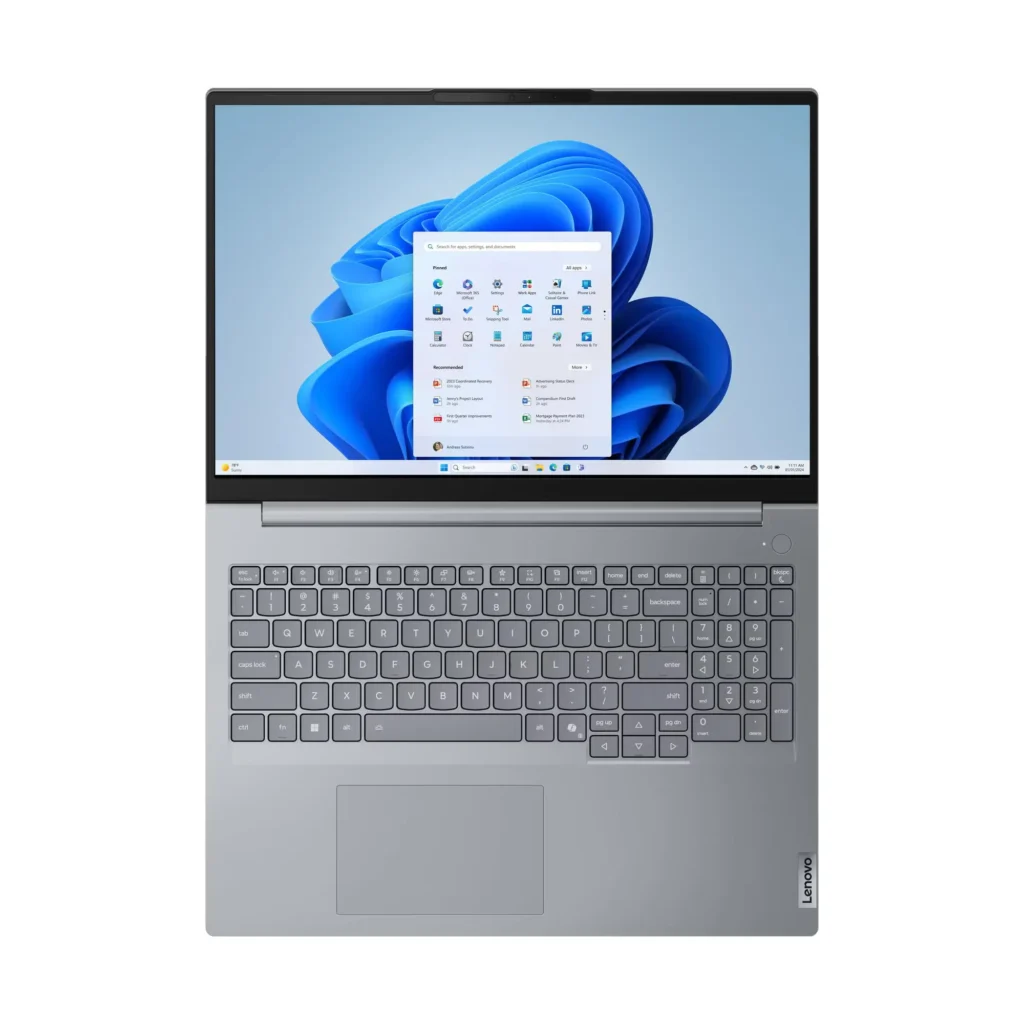
Lenovo’s keyboards are typically reliable, and the ThinkBook 16 G8 delivers a decent typing experience. The backlit keyboard provides visibility in low-light conditions, and key travel should be reasonable for extended typing sessions.
The precision touchpad (75 x 120mm) with buttonless Mylar surface supports Windows Precision Touchpad gestures, providing smooth tracking for everyday navigation.
For business users who spend significant time typing documents, emails, and reports, the keyboard and trackpad are functional and adequate without being exceptional.
Ports and Connectivity – A Strong Point
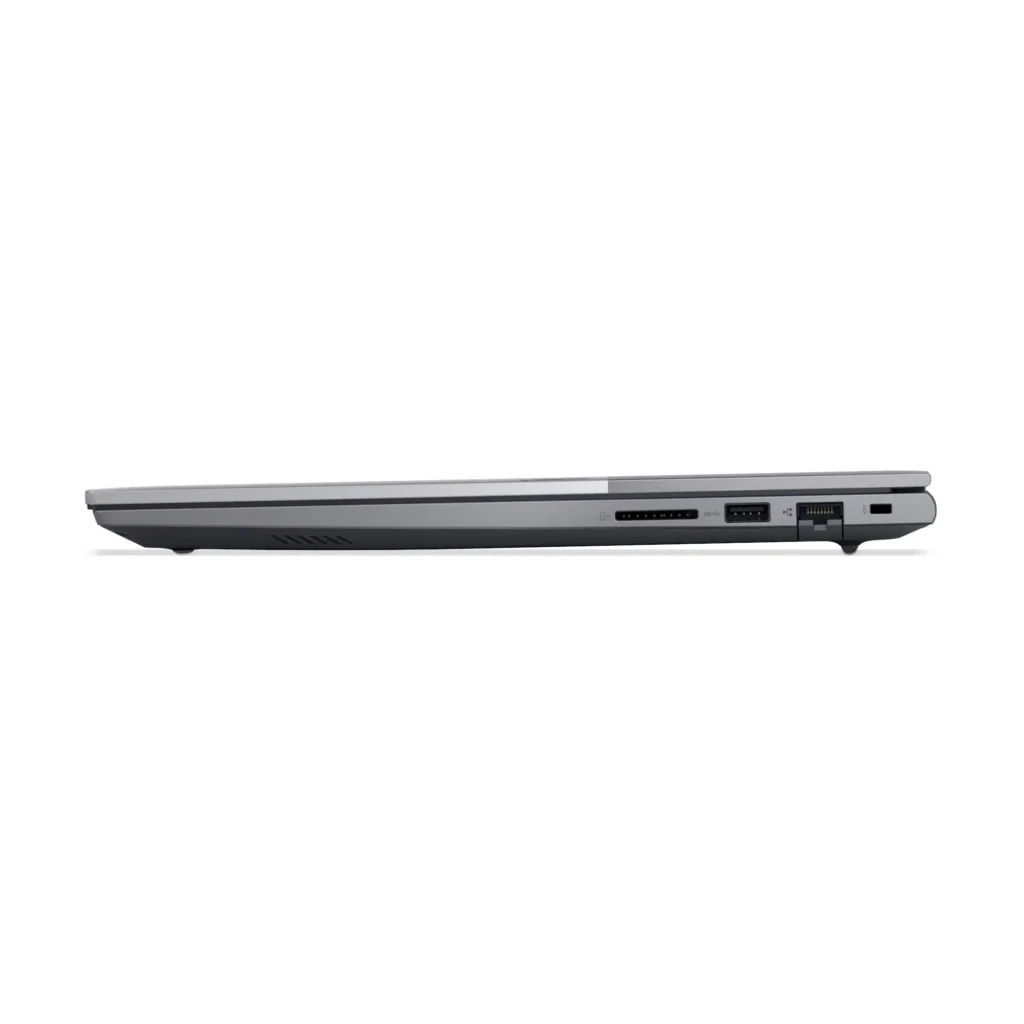

Here’s where the ThinkBook 16 G8 truly excels. The port selection is comprehensive and business-appropriate:
- 2x USB-A (5Gbps, one Always On)
- 1x USB-C (10Gbps, PD 3.0, DisplayPort 1.4)
- 1x Thunderbolt 4 (40Gbps, PD 3.0, DisplayPort 2.1)
- HDMI 2.1 (4K/60Hz)
- Gigabit Ethernet (RJ-45)
- SD card reader
- 3.5mm combo audio jack
- Kensington Nano Security Slot
Having Thunderbolt 4 at this price point is fantastic – this enables ultra-fast data transfer, high-resolution external displays, and compatibility with Thunderbolt docking stations. Most budget business laptops omit Thunderbolt to save costs.
The Gigabit Ethernet port is crucial for business environments – wired connections provide stable, secure connectivity that Wi-Fi can’t match. Many thin laptops omit Ethernet, making the ThinkBook’s inclusion valuable.
The SD card reader is useful for photographers, content creators, or anyone regularly transferring files from cameras or devices.
The HDMI 2.1 port supports modern displays and projectors at 4K/60Hz, important for presentations and external monitor setups.
Wi-Fi 6E provides fast wireless connectivity with access to the 6GHz band, and Bluetooth 5.3 handles wireless peripherals.
The port selection is genuinely excellent for a business laptop at this price – Lenovo hasn’t cut corners here.
Security Features – Business Appropriate
The ThinkBook 16 G8 includes comprehensive security features appropriate for business use:
- Firmware TPM 2.0 – Hardware-based security chip
- Fingerprint reader – Integrated into power button for convenient biometric login
- IR camera – Windows Hello facial recognition for passwordless login
- Camera privacy shutter – Physical cover for webcam
- Kensington Nano Security Slot – Physical lock support for securing the laptop
These features provide robust security for business environments where data protection matters. The combination of fingerprint and facial recognition gives users convenient biometric options.
Audio and Webcam
The stereo speakers with Dolby Audio and Realtek ALC3287 codec deliver decent sound for a business laptop. Audio is adequate for video calls and casual media consumption, though serious listening benefits from headphones.
The 1080p FHD camera with IR sensor is a genuine upgrade over 720p cameras. Video call quality is noticeably better, and the IR sensor enables Windows Hello facial recognition. The camera privacy shutter provides physical security when not in use.
For business users doing frequent video calls, the upgraded camera is a significant benefit.
Windows 11 Pro
Having Windows 11 Pro included rather than Home edition adds genuine value for business users. Pro features include:
- BitLocker encryption
- Remote Desktop
- Group Policy management
- Windows Update for Business
- Hyper-V virtualization
These features matter for businesses and IT-managed environments, and having Pro included at this price point is excellent value.
Value Comparison
At $1,097-1,149, how does this compare to alternatives?
Consumer 16-inch laptops: Similar money but lack business features (Windows 11 Pro, security features, build quality)
ThinkPad E16: Very similarly priced at the moment
Dell Pro 16: Similar pricing with comparable compromises
The ThinkBook 16 G8 represents solid value for money if you can accept the display and battery compromises. The inclusion of Windows 11 Pro, Thunderbolt 4, Ethernet, security features, and lightweight design add up to a compelling package at this price.
Pros:
- Excellent price point ($1,097-1,149)
- Windows 11 Pro included (saves $200+ vs Home)
- 1080p IR camera with Windows Hello facial recognition
- Fingerprint reader integrated into power button
- Thunderbolt 4 port at budget price
- Gigabit Ethernet for stable business connectivity
- SD card reader included
- Reasonably lightweight at 1.7kg for 16-inch laptop
- Upgradable RAM via two SODIMM slots (up to 64GB)
- Two M.2 slots for storage expansion
- MIL-STD-810H durability certification
- Comprehensive security features
- 90% screen-to-body ratio with thin bezels
- Backlit keyboard
- USB-C charging with 65W adapter
- Modern connectivity (Wi-Fi 6E, Bluetooth 5.3)
- Kensington Security Slot
- Multiple configurations available
Cons:
- Very poor display quality (45% NTSC/~62% sRGB) – colours look washed out
- Tiny 45Wh battery for 16″ laptop – poor battery life
- Build quality compromised by plastic bottom
- Only 512GB storage in base configuration
- No dedicated graphics option
- 60Hz refresh rate dated for 2025
- Only 300 nits brightness struggles in bright environments
- Integrated graphics limit creative/multimedia work
- Some chassis flex due to plastic construction
Final Verdict
The Lenovo ThinkBook 16 G8 is a business laptop that delivers excellent value for money if you can accept its significant compromises. At $1,097-1,149 with Windows 11 Pro, Thunderbolt 4, comprehensive security features, and lightweight 1.7kg design, it offers genuine business functionality at an accessible price point.
However, the very poor display quality (45% NTSC) and tiny 45Wh battery are critical flaws that impact daily usability. You’ll be staring at washed-out colours every time you use the laptop, and you’ll be hunting for power outlets constantly due to poor battery life. These aren’t minor inconveniences – they’re fundamental limitations that affect the core experience.
Who should buy this laptop:
- Budget-conscious businesses needing Windows 11 Pro
- Professionals who primarily work plugged in at desks
- Users who need Thunderbolt 4 and Ethernet at budget pricing
- IT departments buying multiple units where cost matters more than display quality
- Students needing business features on a budget
Who should avoid this laptop:
- Anyone needing good display quality or colour accuracy
- Mobile professionals requiring all-day battery life
- Creative professionals (display is unsuitable)
- Anyone who values build quality over price
At $1,097-1,149, the ThinkBook 16 G8 delivers the business features and connectivity you need, but forces you to accept a poor display and inadequate battery. If you work primarily at a desk with the laptop plugged in and don’t care about colour accuracy, the value proposition makes sense. But for most users, spending $200-300 more on a ThinkPad E16 or better-configured alternative will deliver a far more satisfying experience.
The ThinkBook 16 G8 isn’t bad – it’s just clearly optimized for price over experience. Buy it if budget is your primary constraint and you understand exactly what you’re compromising. Otherwise, save up for something better that won’t frustrate you daily with a washed-out display and constant battery anxiety.
Multiple configurations exist, so consider higher-spec models with Core 7 processors or more RAM if your budget allows – though the display and battery limitations remain across the lineup.