The laptop market is going through a transformation. For decades, Windows laptops have been powered by x86 processors from Intel and AMD, but ARM-based chips – the same architecture that powers smartphones – are now making serious inroads into Windows computing. Qualcomm’s Snapdragon X series represents the latest push into this territory, promising exceptional battery life and AI capabilities without the traditional performance compromises of earlier ARM Windows attempts.
HP’s OmniBook series marks the return of a classic brand name, now repositioned as HP’s premium thin-and-light lineup. The OmniBook 5 is HP’s entry into the Snapdragon X laptop space, targeting professionals, students, and mobile workers who prioritise battery life and portability over raw performance.
With a stunning OLED display, claimed battery life of over 26 hours, and a featherweight 1.29kg chassis, the OmniBook 5 looks impressive on paper. But ARM-based Windows laptops come with caveats – software compatibility, performance in emulated applications, and real-world usability all need scrutiny. At prices ranging wildly from $998 to $1,599 depending on retailer, is the OmniBook 5 worth considering, or should you stick with traditional x86 laptops? Let’s dig in.
Pros
- Exceptional battery life
- Stunning 2K OLED display
- Incredibly lightweight
- Premium aluminum construction
Cons
- Keyboard feels cheap and plasticky
- ARM architecture has app compatibility limitations
- Onboard RAM not upgradable
Key Specifications
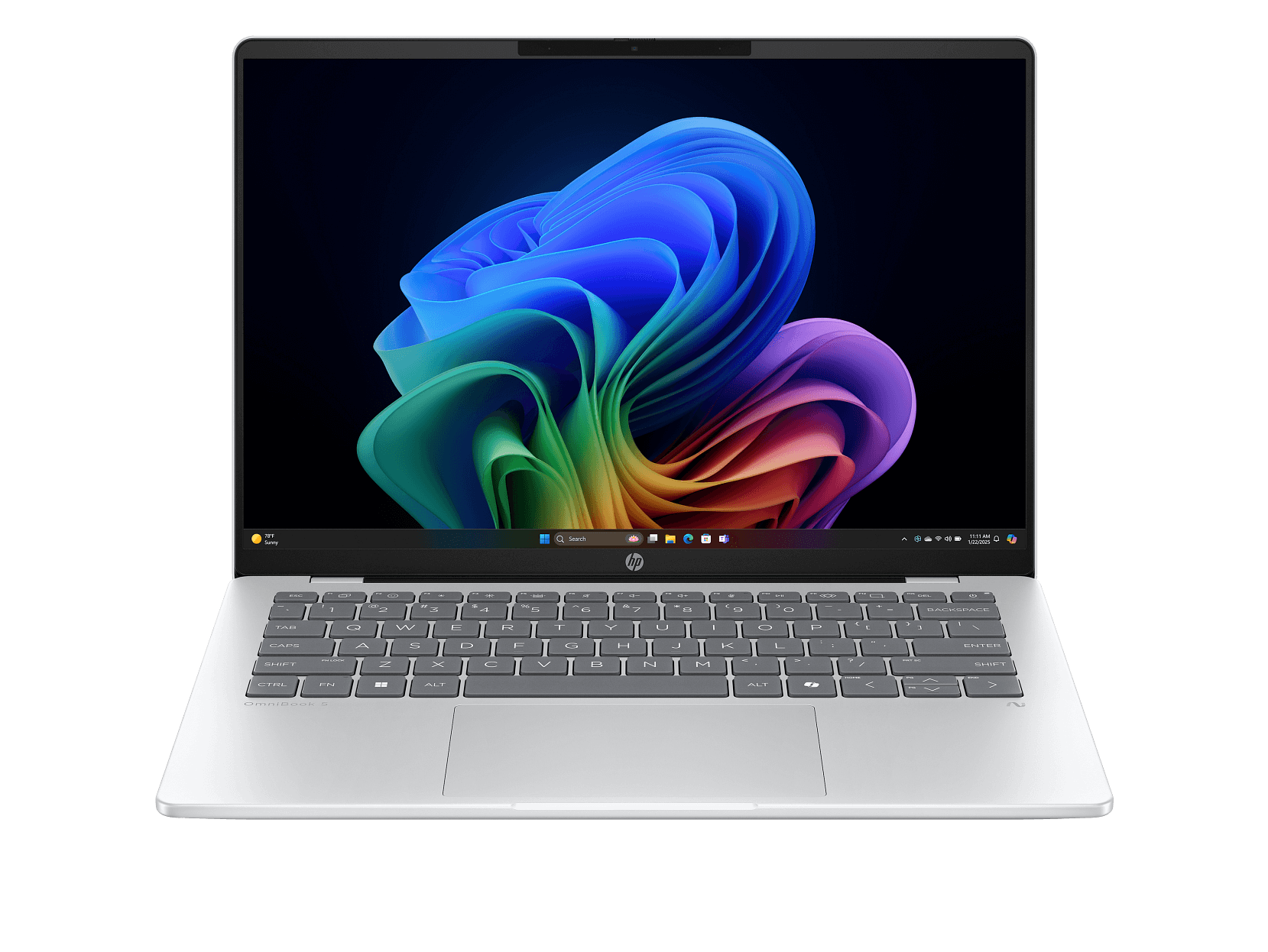
- Display: 14″ 2K (1920 x 1200), OLED, 0.2ms response time, 300 nits, 95% DCI-P3, 16:10 aspect ratio
- Processor: Qualcomm Snapdragon X X1-26-100 (8 cores, up to 2.97 GHz, 30MB L2 cache)
- Neural Processing Unit: Qualcomm Hexagon NPU (45 TOPS for AI tasks)
- Memory: 16 GB LPDDR5x-8448 (onboard, not upgradable)
- Storage: 512 GB PCIe Gen4 NVMe SSD
- Graphics: Qualcomm Adreno GPU (integrated)
- Operating System: Windows 11 Home
- Wireless: Wi-Fi 6E, Bluetooth 5.3 (Qualcomm FastConnect 6900)
- Battery: 59 Wh, 3-cell – up to 26.5 hours claimed
- Ports: 2x USB-C (10Gbps, Power Delivery, DisplayPort 1.4a, Sleep and Charge), 1x USB-A (10Gbps), headphone/mic combo
- Keyboard: Full-size, backlit
- Camera: 1080p FHD IR with privacy shutter
- Weight: 1.29 kg
- Dimensions: 312.1 x 217.5 x 12.6 mm
- Build: Aluminum (sandblasted anodized)
- Colour: Glacier Silver
- Power: 65W USB-C adapter with fast charging (50% in 30 minutes)
- Screen-to-body ratio: 90.46%
- Certifications: EPEAT Gold, Energy Star
- Part Number: C0AY8PA
- Price: Harvey Norman $998 (on sale), JB Hi-Fi $1,599, Officeworks
$1,579$997 now, HP Store $1,299 (with FRENZY code: ~$1,169)
Understanding the Snapdragon X Platform
Before diving into the review, it’s important to understand what makes this laptop different. The Snapdragon X X1-26-100 is an ARM-based processor, the same architecture that powers your smartphone. This is fundamentally different from the x86 architecture used by Intel and AMD processors that have dominated Windows laptops for decades.
What does this mean in practice?
- Native ARM apps run brilliantly with excellent efficiency
- x86 apps run through emulation, which works but with some performance overhead
- 64-bit x86 apps are generally well-supported through Windows 11’s emulation
- Some specialized software (particularly older apps, certain games, or niche professional tools) may not work at all
Microsoft Office, Chrome, Edge, and many mainstream apps now have native ARM versions that run perfectly. But if you rely on specific professional software or older applications, you’ll need to check compatibility before buying.
The upside? Exceptional battery life and efficient performance for everyday tasks. The downside? Potential compatibility headaches with some software.
Design and Build Quality
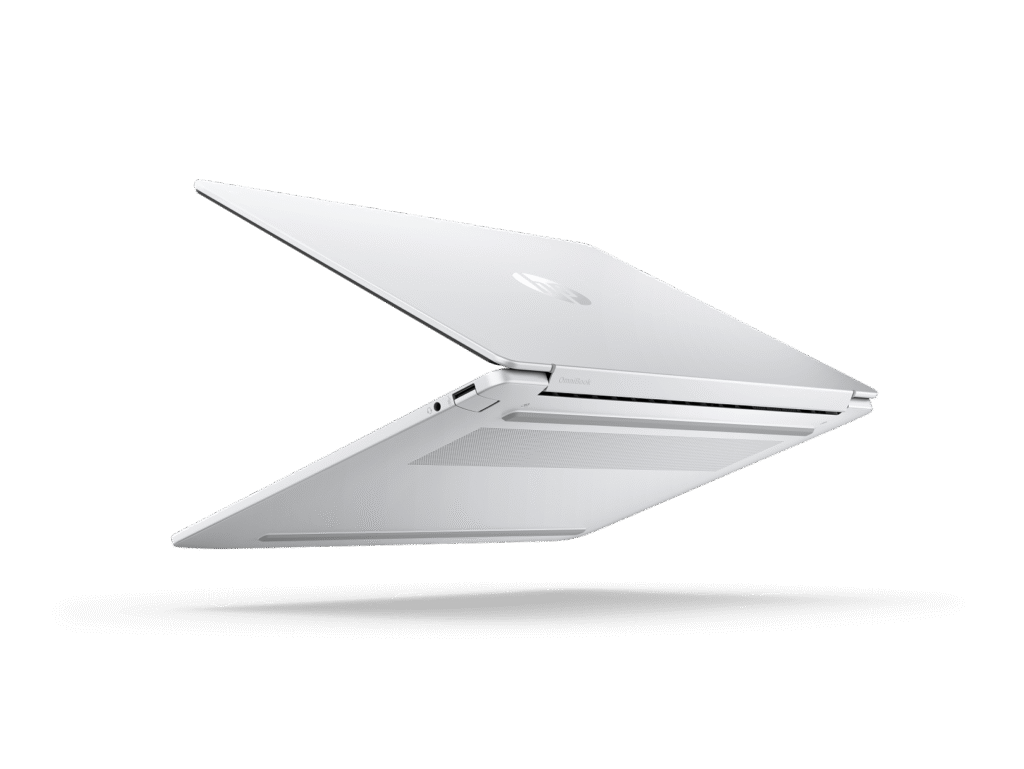
The HP OmniBook 5 feels genuinely premium in hand. The aluminum chassis with sandblasted anodized finish in Glacier Silver looks sophisticated and professional. At just 1.29kg, it’s remarkably light – you barely notice it in a bag, making it ideal for students carrying it between lectures or professionals on the move.
The build quality is solid, with minimal flex in the chassis or lid. HP has clearly invested in premium materials for the external construction, achieving a 90.46% screen-to-body ratio with thin bezels that maximize the display while keeping the overall footprint compact.
At just 12.6mm thick, it’s genuinely thin, slipping easily into bags alongside books or documents. The combination of light weight and slim profile makes this one of the most portable 14-inch laptops available.
The sandblasted anodized finish feels quality and resists fingerprints reasonably well. The camera privacy shutter is a welcome security feature, and the 1080p IR camera supports Windows Hello facial recognition for convenient biometric login.
HP has also incorporated sustainable materials – ocean-bound plastic in the speakers and bezel, plus post-consumer recycled plastic in the keyboard and recycled metal throughout the chassis. The laptop is EPEAT Gold certified with Climate+ rating, showing HP’s environmental commitments.
However, there’s a jarring disconnect when you open the laptop and use the keyboard – more on that shortly.
Display

The 14-inch OLED display is a genuine highlight. OLED technology delivers several advantages over traditional LCD panels:
- Perfect blacks – OLED pixels turn completely off for true black, creating infinite contrast
- Vibrant colours – 95% DCI-P3 colour gamut coverage delivers rich, accurate colours
- Fast response time – 0.2ms response eliminates motion blur and ghosting
- Wide viewing angles – colours and contrast remain consistent from any angle
The 2K resolution (1920 x 1200) in a 16:10 aspect ratio provides extra vertical space compared to standard 16:9 displays, which is particularly useful for productivity work. Text appears sharp and clear, making document editing and web browsing pleasant experiences.
For media consumption, the OLED panel truly shines. Watching movies or videos delivers deep blacks and vibrant colours that LCD panels simply can’t match. The BrightView glossy finish enhances colour vibrancy, though it does create reflections in bright environments.
However, there’s a significant caveat: brightness. At just 300 nits, this OLED display is dimmer than many competitors. OLED panels typically struggle with peak brightness compared to high-end LCDs, and 300 nits is marginal for outdoor use or very bright indoor environments. Working near windows or outdoors will be challenging.
This might be what the reviewer meant by “screen could have been better” – while OLED delivers stunning image quality, the limited brightness holds it back in bright conditions. For indoor use in typical office or home lighting, though, this display is genuinely excellent.
The Low Blue Light certification suggests HP has implemented flicker-free technology and reduced blue light emissions, which can help reduce eye strain during extended use.
Performance
The Snapdragon X X1-26-100 delivers capable performance for everyday computing tasks – web browsing, document editing, email, video streaming, and light multitasking all run smoothly. For native ARM applications, performance feels snappy and responsive.
The 16GB of LPDDR5x-8448 memory is extremely fast (8448 MT/s is significantly faster than typical DDR5-5200 or DDR5-5600), providing excellent memory bandwidth. However, it’s soldered onboard with no upgrade path – you’re stuck with 16GB for the laptop’s lifetime.
The integrated Qualcomm Adreno GPU handles basic graphics tasks adequately. You can do light photo editing, video playback (including 4K), and basic creative work. However, gaming capability is limited – expect only older titles or very light games to run acceptably.
For emulated x86 applications, performance takes a hit. Microsoft’s emulation layer works reasonably well for most mainstream applications, but you’ll notice slower performance compared to running the same apps on native x86 hardware. The good news is that most major applications now have native ARM versions, including:
- Microsoft Office suite
- Google Chrome
- Microsoft Edge
- Adobe Acrobat Reader
- Spotify
- Zoom
- Many others
The 512GB PCIe Gen4 SSD provides quick storage performance with fast boot times and application loading. Storage speed matches what you’d expect from modern x86 laptops.
The Qualcomm Hexagon NPU with 45 TOPS (Trillion Operations Per Second) is designed for AI workloads – Windows 11’s AI features, image processing, video effects, and other machine learning tasks. This positions the laptop as “AI-ready” for upcoming Windows features and applications that leverage neural processing.
For typical office work, web browsing, video calls, and media consumption, the OmniBook 5 performs admirably. For specialized professional software, gaming, or heavy creative work, you’ll want to carefully research ARM compatibility first.
Keyboard and Trackpad
Here’s where the OmniBook 5 stumbles. Despite the premium aluminum exterior, the keyboard feels disappointingly plasticky and cheap. The keys have a hollow, mushy feel that doesn’t match the quality of the rest of the laptop. For a device costing $1,000-1,600, the keyboard should feel better than this.
Key travel is shallow, and the tactile feedback is underwhelming. Extended typing sessions aren’t particularly pleasant, with the plasticky feel constantly reminding you of where HP cut costs. The backlit keyboard is useful for low-light conditions, but it doesn’t compensate for the poor typing feel.
The full-size layout is at least well-spaced, and the soft gray colour scheme matches the Glacier Silver aesthetic. There’s no numeric keypad, which keeps the main keyboard centred and prevents the cramped feel of keyboards on larger laptops.
The trackpad is adequately sized and uses Windows Precision drivers, so multi-touch gestures work reliably. Tracking is smooth and accurate, though the surface doesn’t have the premium glide of glass trackpads on more expensive laptops.
For anyone who spends significant time typing – students writing essays, professionals drafting documents – the subpar keyboard is a genuine disappointment that impacts the daily experience.
Battery Life
This is where the Snapdragon X platform truly excels. HP claims up to 26 hours and 30 minutes of video playback, and while real-world mixed usage won’t quite hit that number, battery life is genuinely exceptional.
In typical use – web browsing, document editing, video streaming, video calls – you’re looking at 8-10 hours of battery life. That’s genuinely all-day endurance with plenty to spare. For light use, you might stretch it to 14-18 hours.
The ARM architecture’s efficiency, combined with the 59Wh battery, delivers what traditional x86 laptops simply can’t match. You can legitimately leave the charger at home for a full workday or study session without anxiety.
Fast charging is a bonus – 50% charge in 30 minutes using the 65W USB-C adapter means you can quickly top up during breaks. USB-C charging also means you could potentially use compatible third-party chargers or power banks in emergencies.
For students, travelers, or anyone who works remotely, this battery life is transformative. It’s genuinely one of the best aspects of Snapdragon X laptops.
Ports and Connectivity

The port selection is modern and functional:
- 2x USB-C (10Gbps, Power Delivery, DisplayPort 1.4a, HP Sleep and Charge)
- 1x USB-A (10Gbps)
- 1x headphone/microphone combo
Having 10Gbps USB ports (both Type-C and Type-A) is genuinely fast – that’s USB 3.2 Gen 2 speeds, which is faster than the 5Gbps USB 3.2 Gen 1 ports on many competitors. Data transfer is quick, and you can connect high-resolution external displays via USB-C DisplayPort.
The Sleep and Charge feature on the USB-C ports means you can charge your phone from the laptop even when it’s sleeping, which is handy.
However, there’s no HDMI port, SD card reader, or Ethernet port. For a thin-and-light focused on portability, this isn’t surprising, but you’ll need adapters or USB-C hubs for additional connectivity.
Wi-Fi 6E (Qualcomm FastConnect 6900) provides fast wireless connectivity with support for the 6GHz band, ensuring good performance on compatible routers. Bluetooth 5.3 handles wireless peripherals reliably.
Audio and Webcam
The dual speakers with HP Audio Boost deliver decent audio for a thin laptop. Sound is clearer and fuller than basic laptop speakers, with reasonable volume and some bass presence. They’re fine for video calls, YouTube, and casual media consumption, though serious music listening or movie watching still benefits from headphones or external speakers.
The 1080p FHD IR camera is a significant upgrade over 720p cameras found on most laptops. Video call quality is noticeably better, with improved clarity and detail. The IR sensor supports Windows Hello facial recognition for convenient, secure login. The dual microphone array with noise reduction helps ensure your voice comes through clearly during calls.
Pricing
There’s significant price variation across retailers:
- Harvey Norman: $998 (on sale, $500 off)
- HP Store: ~$1,169 (using FRENZY code for 10% off – otherwise $1,299)
- Officeworks:
$1,579– they’ve dropped the price to $997 to beat Harvey Norman. Gotta love competition! - JB Hi-Fi: $1,599
At Harvey Norman’s $998 OfficeWorks $997 price, that’s exceptional value and makes this laptop a compelling purchase. At $1,169 from HP direct, it’s still competitive. But at $1,579-1,599, the value proposition weakens significantly – you’d be better off looking at x86 alternatives with fewer compatibility concerns.
Always shop around and price-match when buying this laptop. The pricing variance is enormous.
Pros:
- Exceptional battery life (26+ hours video playback, 8-10 hours real-world use)
- Stunning 2K OLED display with perfect blacks and 95% DCI-P3 colour
- Incredibly lightweight at 1.29kg – supremely portable
- Premium aluminum construction with quality feel
- 1080p IR camera significantly better than 720p alternatives
- Fast 10Gbps USB-C and USB-A ports
- USB-C charging with fast charge support
- Backlit keyboard
- Windows Hello facial recognition
- 45 TOPS NPU for AI workloads
- Excellent value at OfficeWorks $997 sale price
- Wi-Fi 6E for fast wireless connectivity
- Sustainable materials and EPEAT Gold certified
Cons:
- Keyboard feels cheap and plasticky despite premium exterior
- ARM architecture limits software compatibility (some apps won’t work)
- OLED display brightness limited to 300 nits – struggles outdoors
- Onboard RAM not upgradable beyond 16GB
- Limited gaming capability with integrated Adreno GPU
- No HDMI, Ethernet, or SD card reader
- Emulated x86 apps run slower than on native x86 hardware
- Pricing varies wildly between retailers ($998-$1,599)
Final Verdict
The HP OmniBook 5 14-he0013QU represents the promise and compromises of ARM-based Windows computing. The exceptional battery life, stunning OLED display, and incredibly light 1.29kg weight make it genuinely compelling for mobile productivity. If you spend your day in Office apps, web browsers, and video calls while constantly on the move, this laptop delivers an experience that traditional x86 laptops struggle to match.
The Snapdragon X platform has matured significantly – Windows 11 on ARM is far more capable than earlier attempts, and major applications now have native ARM versions. For mainstream computing, it works well. But the ARM architecture remains a limitation if you rely on specialized software, older applications, or gaming.
The plasticky keyboard is a genuine disappointment that undermines the otherwise premium experience. For a laptop in this price range, HP should have delivered better. It’s functional but not enjoyable to use for extended typing sessions.
At Harvey Norman’s $998 OfficeWorks $997 sale price, the OmniBook 5 is exceptional value—you’re getting premium portability, battery life, and an OLED display for under $1,000. At that price, the keyboard compromise and ARM limitations become easier to accept. At $1,169 from HP direct (with coupon), it’s still competitive. But at $1,579-1,599, the value proposition weakens significantly compared to x86 alternatives.
Who should buy this:
- Students who need all-day battery life for lectures and study
- Mobile professionals constantly working on the go
- Anyone who prioritizes portability and battery life over raw performance
- Users whose software needs are met by mainstream applications
Who should avoid this:
- Gamers (limited capability)
- Users relying on specialized professional software without ARM versions
- Anyone needing maximum performance for creative work
- Those who do extensive typing and want a quality keyboard
For those wanting x86 compatibility without compromise, consider the ASUS ZenBook 14 OLED or Lenovo IdeaPad Slim 5 with similar portability but traditional Intel/AMD processors. If battery life is your absolute priority and you can accept ARM limitations, the OmniBook 5 delivers.
Shop around for the best price – the Harvey Norman deal at $998 makes this a no-brainer if you can live with ARM Windows. At full retail pricing, it’s harder to recommend over x86 alternatives. Either way, the exceptional battery life and OLED display make this worth considering if your software needs align with ARM capabilities.