Two-in-one laptops promise versatility – traditional laptop mode for productivity, tablet mode for reading or drawing, and tent or stand modes for media consumption. But that flexibility typically comes with trade-offs: added weight from the 360-degree hinge, higher prices, and compromises in either performance or portability. Finding a 2-in-1 that balances these factors at a reasonable price is challenging.
Yesterday we reviewed HP’s OmniBook 5 with Snapdragon X ARM processor, which delivered exceptional battery life but came with software compatibility limitations. Today’s HP OmniBook 5 Flip takes a different approach – it uses a traditional Intel processor for full Windows compatibility, adds 2-in-1 flexibility with a 360-degree hinge, and trades the OLED display for an IPS touchscreen.
On sale At $1,198 (regular price $1,798), the OmniBook 5 Flip targets students, mobile professionals, and anyone who values flexibility in how they use their laptop. With a 13th Gen Intel Core i5, 16GB RAM, massive 1TB storage, and touchscreen display, the specs look solid on paper. But does it deliver a cohesive 2-in-1 experience, or do the compromises drag it down? Let’s find out.
Pros
- Generous 1TB storage
- Decent battery life
- Strong sales price at the moment
Cons
- Basic performance from Core i5-1334U
- IPS display with only 62.5% sRGB coverage
- Can get noticeably hot and noisy under load
Key Specifications
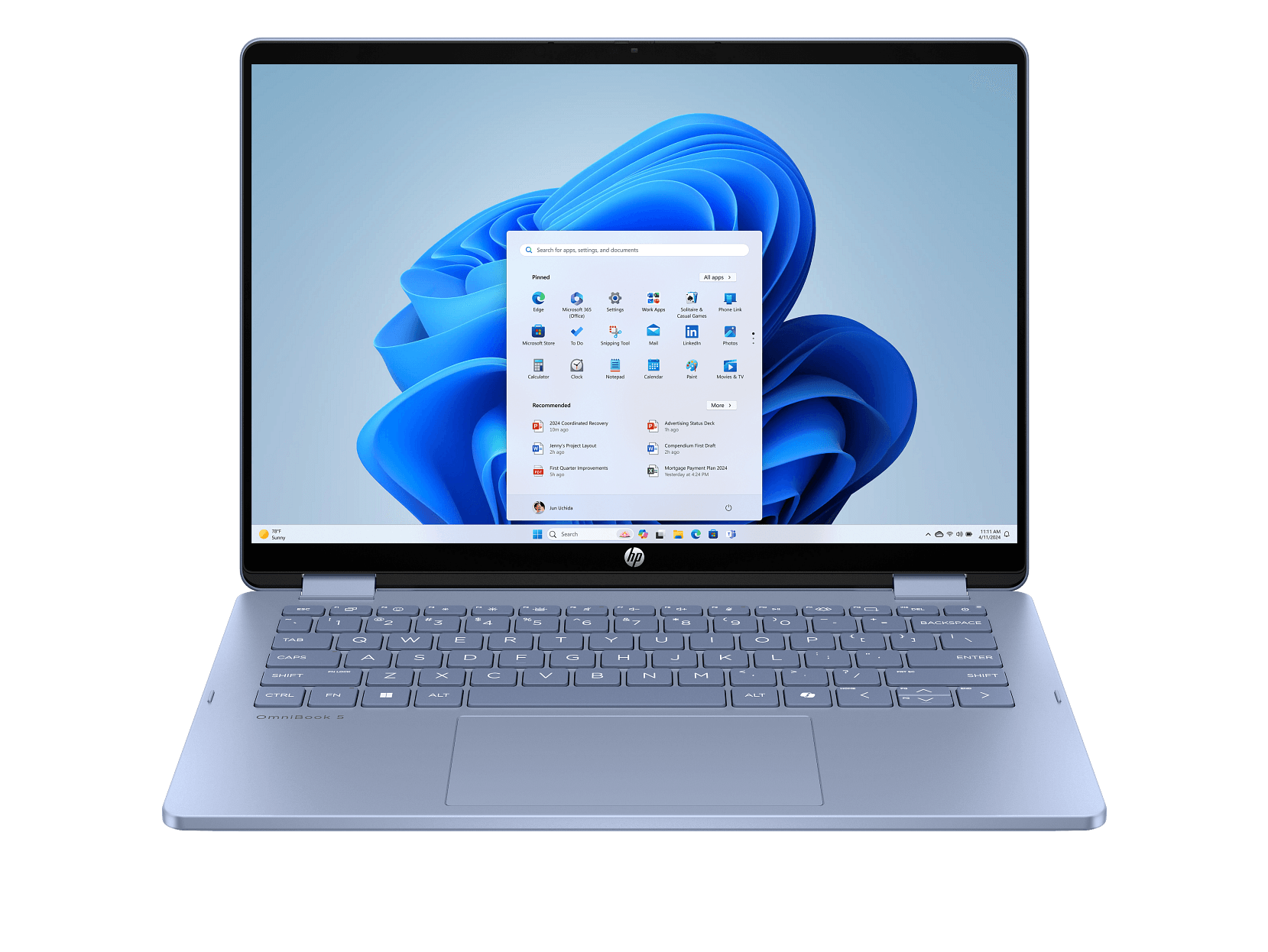
- Display: 14″ 2K (1920 x 1200), multitouch IPS, 300 nits, 62.5% sRGB, 16:10 aspect ratio, edge-to-edge glass, flicker-free
- Processor: Intel Core i5-1334U (13th Gen, 10 cores, 12 threads, up to 4.6 GHz, 12MB L3 cache)
- Memory: 16 GB LPDDR5-5200 (onboard, not upgradable)
- Storage: 1 TB PCIe Gen4 NVMe SSD
- Graphics: Intel Iris Xe Graphics (integrated)
- Operating System: Windows 11 Home
- Wireless: Wi-Fi 6, Bluetooth 5.4 (Realtek)
- Battery: 68 Wh, 4-cell – up to 15 hours mixed use, 21.5 hours video playback
- Ports: 2x USB-C (10Gbps, Power Delivery 3.1, DisplayPort 1.4a, Sleep and Charge), 1x USB-A (10Gbps), 1x USB-A (5Gbps), HDMI 2.1, headphone/mic combo
- Keyboard: Full-size (darker sky blue, non-backlit)
- Camera: 1080p FHD with privacy shutter
- Weight: 1.62 kg
- Dimensions: 313 x 219.9 x 18.4 mm
- Colour: Sky Blue
- Power: 45W USB-C adapter
- Screen-to-body ratio: 89%
- Input devices: Accelerometer, Gyroscope (for auto-rotation)
- Certifications: EPEAT Gold, Energy Star
- Price: Harvey Norman $1,198 (on sale from $1,798)
Comparing to the ARM OmniBook 5
Before jumping into the details, it’s worth comparing this Flip model to yesterday’s ARM-powered OmniBook 5:
ARM Model wins:
- Much lighter (1.29kg vs 1.62kg)
- Stunning OLED display with 95% DCI-P3 vs IPS with 62.5% sRGB
- Better battery life (26+ hours vs 15-21 hours)
- Thinner (12.6mm vs 18.4mm)
Flip Model wins:
- Full x86 Windows compatibility (no ARM limitations)
- 2-in-1 convertible design with touchscreen
- Double the storage (1TB vs 512GB)
- More ports including HDMI 2.1
- Traditional Intel processor for broader software support
Essentially, the Flip trades portability, display quality, and extreme battery life for versatility and compatibility. Which matters more depends entirely on your needs.
Design and Build Quality
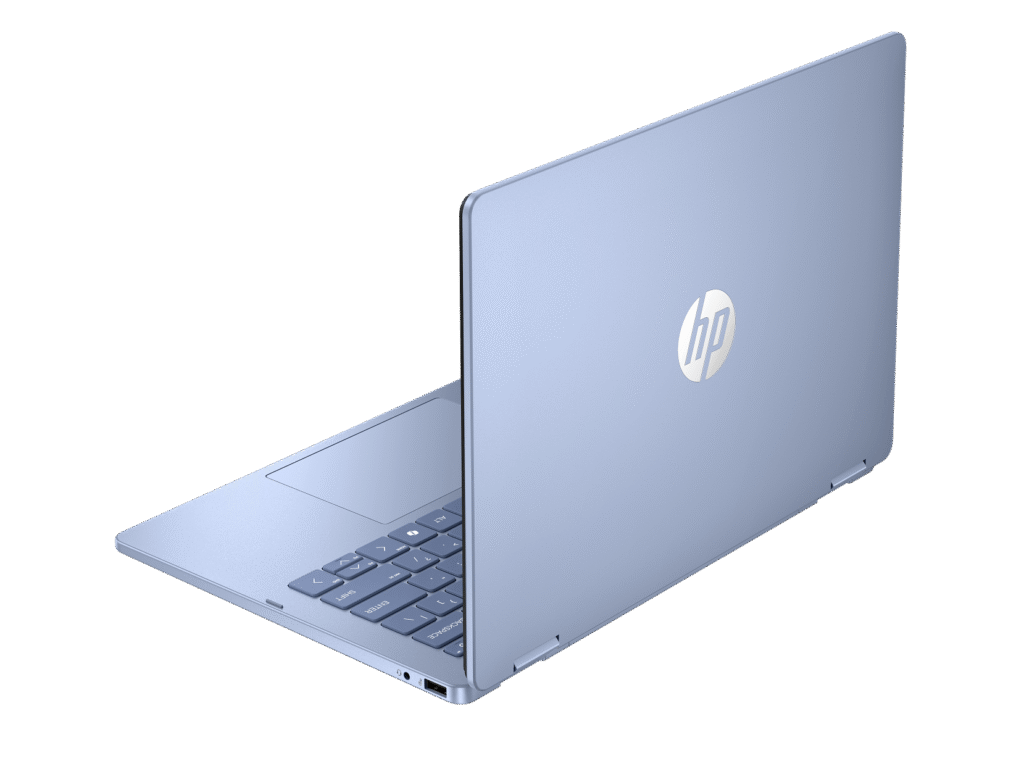
The HP OmniBook 5 Flip comes in a distinctive Sky Blue finish that stands out from the typical silver and grey laptop crowd. The paint finish on the cover and base feels quality, though it’s not as premium as the aluminum construction on the ARM model. At 1.62kg, it’s noticeably heavier than the ARM version’s 1.29kg, with the extra weight coming from the 360-degree hinge mechanism and touchscreen.
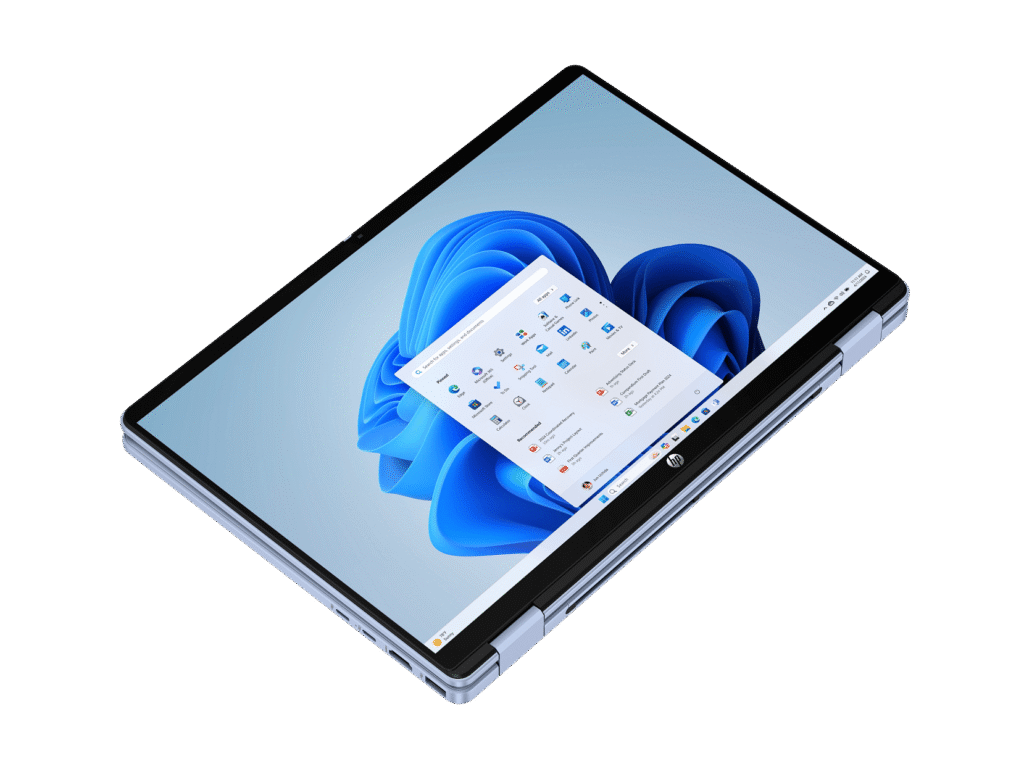
The 360-degree hinge feels solid and well-engineered, allowing you to flip the laptop into various modes:
- Laptop mode for traditional productivity
- Tablet mode with keyboard folded back
- Tent mode for watching videos
- Stand mode for presentations or sharing
The hinge holds positions firmly without wobbling, which is crucial for a convertible. However, at 1.62kg, using this in tablet mode for extended periods isn’t particularly comfortable – your arms will tire. It’s better suited for propping up in stand or tent mode.
At 18.4mm thick, it’s chunkier than the ARM model but still reasonably portable. The Sky Blue colour looks distinctive, though the darker blue keyboard might not appeal to everyone. The edge-to-edge glass on the display adds a premium touch, and the 89% screen-to-body ratio keeps bezels reasonably thin.
The accelerometer and gyroscope enable automatic screen rotation when you flip between modes, which works reliably in practice.
HP has incorporated sustainable materials – ocean-bound plastic in the bezel and speakers, plus post-consumer recycled plastic in the keyboard. EPEAT Gold certification shows environmental consideration.
Build quality feels solid for a mid-range 2-in-1, though it doesn’t quite match the premium feel of the aluminum ARM model or more expensive convertibles.
Display
The 14-inch 2K touchscreen (1920 x 1200) uses an IPS panel with multitouch support. The 16:10 aspect ratio provides extra vertical space compared to standard 16:9 displays, which is useful for productivity work – documents, spreadsheets, and web browsing all benefit.
Touch responsiveness is good, with the capacitive touchscreen accurately registering taps, swipes, and multi-touch gestures. The edge-to-edge glass feels smooth under your fingers, making navigation pleasant.
However, this is where the Flip makes its biggest compromise compared to the ARM model. Instead of the stunning OLED display with 95% DCI-P3 colour coverage, you’re getting a basic IPS panel with just 62.5% sRGB coverage. That’s quite limited – colours look washed out and dull compared to better displays.
For context:
- This Flip model: 62.5% sRGB
- ARM OmniBook 5: 95% DCI-P3 (roughly equivalent to 100% sRGB and then some)
- Decent mid-range laptops: 90-100% sRGB
- Budget laptops: 45-65% sRGB
So this display sits at the lower end of acceptable, better than the worst budget panels but nowhere near good mid-range displays. Colours look flat, and if you’re coming from a phone or tablet with a vibrant OLED screen, the difference will be jarring.
The 300 nits brightness is adequate for indoor use but struggles outdoors or in very bright environments – same limitation as the ARM model’s OLED. The IPS panel does provide decent viewing angles, so colours don’t shift dramatically when viewing off-axis.
The flicker-free technology helps reduce eye strain during extended use, which is welcome. Text appears sharp and clear thanks to the 2K resolution, making it perfectly functional for document work and web browsing.
For media consumption, the display is merely adequate. It shows images and videos, but they lack the vibrancy and pop you’d get from better panels. Given this is a 2-in-1 you might use for watching videos in tent mode, the mediocre display quality is disappointing.
Performance
The Intel Core i5-1334U is a 13th Generation processor with 10 cores (2 performance cores + 8 efficiency cores) and 12 threads, capable of boosting up to 4.6 GHz. This is a power-efficient U-series chip designed for thin-and-light laptops, prioritizing battery life over raw performance.
For everyday tasks – web browsing, document editing, email, video streaming, and light multitasking – the i5-1334U handles things adequately. It’s a traditional x86 processor, so you get full Windows compatibility without the ARM limitations we discussed in yesterday’s review. All your software will work without emulation or compatibility concerns.
The 16GB of LPDDR5-5200 memory is soldered onboard with no upgrade path, but 16GB should suffice for most users. The dual-channel configuration helps maximize memory bandwidth for better integrated graphics performance.
The Intel Iris Xe Graphics handle basic tasks and light creative work reasonably well. You can do photo editing in Lightroom, basic video editing, and even some very light gaming (older titles or esports games on low settings). It’s noticeably better than Intel’s basic UHD Graphics but nowhere near dedicated GPUs.
However, the reviewer noted “basic performance” as a drawback, and this makes sense. The U-series i5 is designed for efficiency rather than power, so intensive tasks like heavy multitasking, serious photo/video editing, or demanding applications will see the processor struggle. The performance cores boost well, but there are only two of them – the eight efficiency cores are weaker.
The 1TB PCIe Gen4 NVMe SSD is genuinely excellent – double the storage of the ARM model. This provides ample space for documents, photos, videos, and applications, plus the speed benefits of modern solid-state storage. Boot times are quick, and applications load rapidly.
Thermal Performance
Here’s where things get problematic. The reviewer specifically noted “fan noise sometimes, also heat” as issues, and this is a common challenge with thin convertibles packing x86 processors.
Under sustained load – video calls, heavier multitasking, or any moderately intensive tasks – the laptop gets noticeably warm, particularly around the keyboard and bottom chassis. The fans spin up with audible noise, which can be distracting during quiet work environments or video calls.
For a 2-in-1 you might use in tablet mode, getting hot is particularly problematic – holding a warm device for extended periods isn’t comfortable. This thermal limitation is partly why the ARM model exists – Snapdragon processors run much cooler and quieter.
The cooling system struggles to balance performance, temperatures, and noise. It’s manageable but not ideal, especially compared to better-cooled laptops or the whisper-quiet ARM model.
Keyboard and Trackpad
The full-size keyboard in darker sky blue lacks backlighting, which is disappointing for a laptop at this price. Working in dim conditions means fumbling for keys or needing external lighting.
Key travel is reasonable, and the typing experience is functional, though not exceptional. The darker blue keyboard matches the Sky Blue aesthetic but might not be to everyone’s taste. There’s no numeric keypad on the 14-inch form factor, keeping the main keyboard centred.
The trackpad is adequately sized with Windows Precision driver support, so multi-touch gestures work reliably. Tracking is smooth for everyday navigation.
Overall, the input experience is merely adequate – it gets the job done without being particularly pleasant or impressive.
2-in-1 Functionality
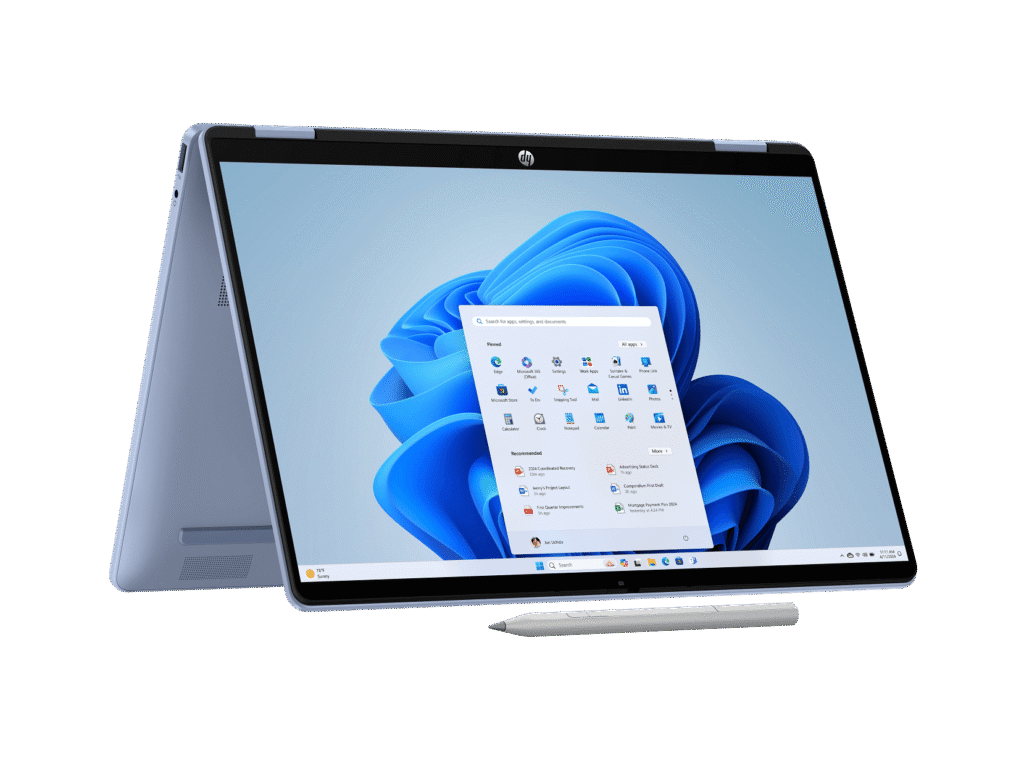
The 360-degree hinge works smoothly for transitioning between modes. The accelerometer and gyroscope enable automatic screen rotation, which generally works reliably.
At 1.62kg, this isn’t the lightest 2-in-1, but it’s reasonable for the category. Using it in tablet mode for extended periods isn’t comfortable due to the weight, but propping it up in tent or stand mode for watching videos or presentations works well.
Unlike some 2-in-1 laptops, there’s no mention of an included active stylus in the specs. The touchscreen supports touch input but likely doesn’t have active pen digitizer support, or if it does, you’d need to purchase a compatible stylus separately. This limits its usefulness for note-taking or digital art compared to convertibles with pen support.
Ports and Connectivity
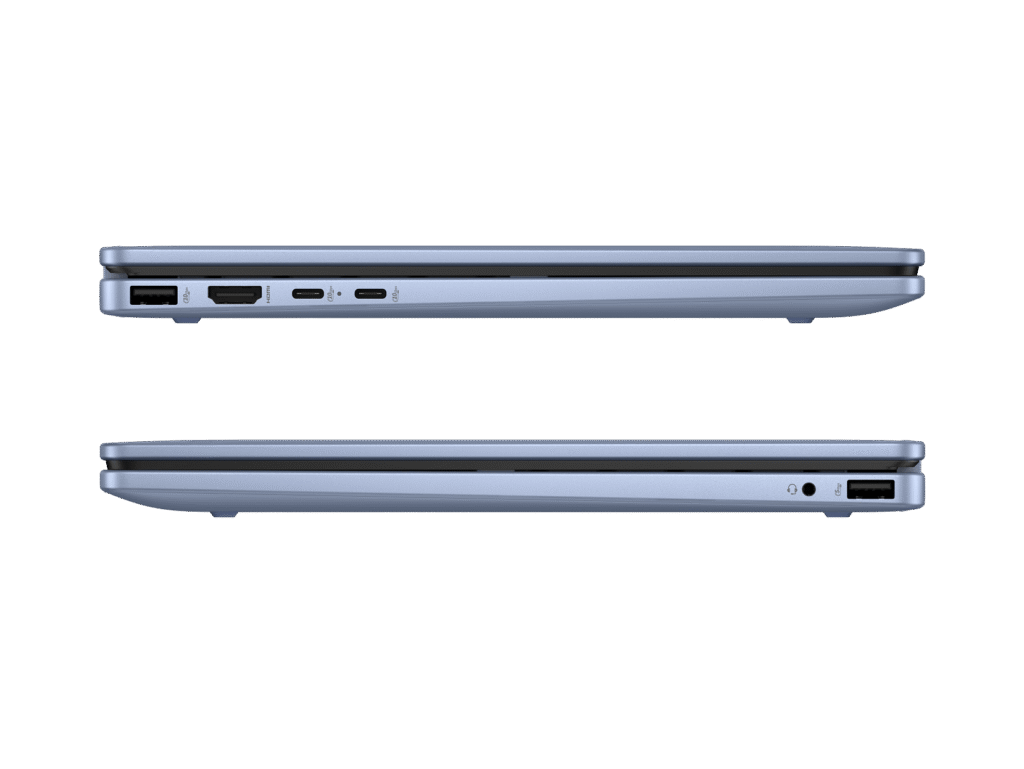
The port selection is decent for a thin 2-in-1:
- 2x USB-C (10Gbps, Power Delivery 3.1, DisplayPort 1.4a, Sleep and Charge)
- 1x USB-A (10Gbps)
- 1x USB-A (5Gbps)
- 1x HDMI 2.1
- 1x headphone/microphone combo
Having HDMI 2.1 is genuinely good – it supports 4K@120Hz or 8K@60Hz output, future-proofing for modern displays and TVs. This is better than the ARM model which had no HDMI port at all.
The mix of fast USB-C (10Gbps) and USB-A ports (both 10Gbps and 5Gbps) provides good flexibility for peripherals and data transfer. USB-C charging with Power Delivery 3.1 means fast charging and potential compatibility with third-party chargers.
The reviewer noted “limited ports” as a drawback, which seems odd given the decent selection. Perhaps they wanted Ethernet or an SD card reader, both absent here. For a thin 2-in-1, the port selection is actually reasonably comprehensive.
Wi-Fi 6 (Realtek) provides fast wireless connectivity, though it’s not Wi-Fi 6E like the ARM model. Bluetooth 5.4 handles wireless peripherals.
Audio and Webcam
The dual speakers with HP Audio Boost deliver adequate audio for a thin laptop. Sound is clearer than basic laptop speakers with reasonable volume, though bass response is minimal. They’re fine for video calls and casual media consumption, but serious listening benefits from headphones or external speakers.
The 1080p FHD webcam matches the ARM model, providing noticeably better video call quality than 720p cameras. The dual microphone array with noise reduction helps ensure clear audio during calls. The camera privacy shutter is a welcome security feature.
Battery Life
The 68Wh battery is larger than the ARM model’s 59Wh, but the traditional x86 processor is less efficient. HP claims up to 15 hours mixed use and 21.5 hours video playback.
In real-world usage:
- Light productivity: 5-9 hours
- Mixed usage: 3-6 hours
- Video streaming: 5-9 hours
This is good battery life for a traditional x86 laptop but falls well short of the ARM model’s exceptional 26+ hours. For an all-day workday or study session, the Flip should get you through, though not with as much margin as the ARM version.
The 45W USB-C charger provides reasonably quick charging, and USB-C charging means potential compatibility with third-party chargers.
For a convertible with x86 processor, this battery life is solid – better than many competitors thanks to the efficient U-series processor and larger battery.
Pros:
- Full x86 Windows compatibility without ARM limitations
- Generous 1TB SSD storage – double the ARM model
- Good battery life (10-15 hours real-world use)
- 2-in-1 convertible design with smooth 360-degree hinge
- HDMI 2.1 port supports 4K@120Hz output
- Multitouch 2K display with 16:10 aspect ratio
- 1080p FHD webcam for better video calls
- Strong sale price at $1,198 (33% off)
- Fast USB-C and USB-A ports (10Gbps)
- Auto-rotation works reliably with accelerometer/gyroscope
- Wi-Fi 6 and Bluetooth 5.4 connectivity
- Camera privacy shutter
Cons:
- Basic performance from Core i5-1334U struggles with intensive tasks
- Gets noticeably hot and noisy under load
- IPS display limited to 62.5% sRGB – colours look washed out
- Much worse display than ARM model’s OLED (95% DCI-P3)
- Heavier at 1.62kg vs ARM model’s 1.29kg
- No keyboard backlighting
- Limited ports (no Ethernet or SD card reader)
- Battery life good but half the ARM model’s endurance
- Onboard RAM not upgradable beyond 16GB
- No active pen included for drawing/notes
- 300 nits brightness struggles outdoors
Final Verdict
The HP OmniBook 5 Flip 2-in-1 occupies an interesting middle ground. It trades the ARM model’s exceptional battery life, OLED display, and extreme portability for full x86 compatibility, double the storage, and convertible versatility. Which model suits you better depends entirely on your priorities.
Choose the Flip if you:
- Need guaranteed x86 Windows compatibility
- Want 2-in-1 flexibility for different usage modes
- Require HDMI output for external displays
- Need 1TB storage
- Prefer traditional Intel processors
Choose the ARM model if you:
- Prioritize battery life above all else
- Want the best display (OLED with 95% DCI-P3)
- Need maximum portability (1.29kg vs 1.62kg)
- Don’t need 2-in-1 functionality
- Can accept ARM software limitations
At $1,198 on sale, the Flip represents solid value for a 2-in-1 convertible with decent specs. The thermal issues (heat and noise) and mediocre display are disappointing, but they’re not unusual for thin convertibles in this price range. The basic performance from the Core i5-1334U might frustrate power users, but it’s adequate for everyday computing.
For students who want versatility for note-taking, presentations, and media consumption, the Flip delivers. For mobile professionals who need traditional Windows compatibility and occasional tent/stand modes for presentations, it works well. Just don’t expect exceptional performance or a stunning display.
For those who don’t need 2-in-1 functionality, consider the Dell Inspiron 14 2-in-1 7445 with better specs for similar money, or save up for the ASUS ZenBook Flip 14 with superior build quality and display. If you specifically want the OmniBook line, seriously consider whether you need convertible functionality- the ARM model at $998 (when on sale) delivers better battery life and display for $200 less.
At $1,198, the OmniBook 5 Flip is a reasonable 2-in-1 option that delivers versatility and compatibility. Just be prepared for thermal compromises, basic performance, and a mediocre display. It’s good enough for everyday use but won’t blow you away in any particular area.