Flagship Power, Sharper Price
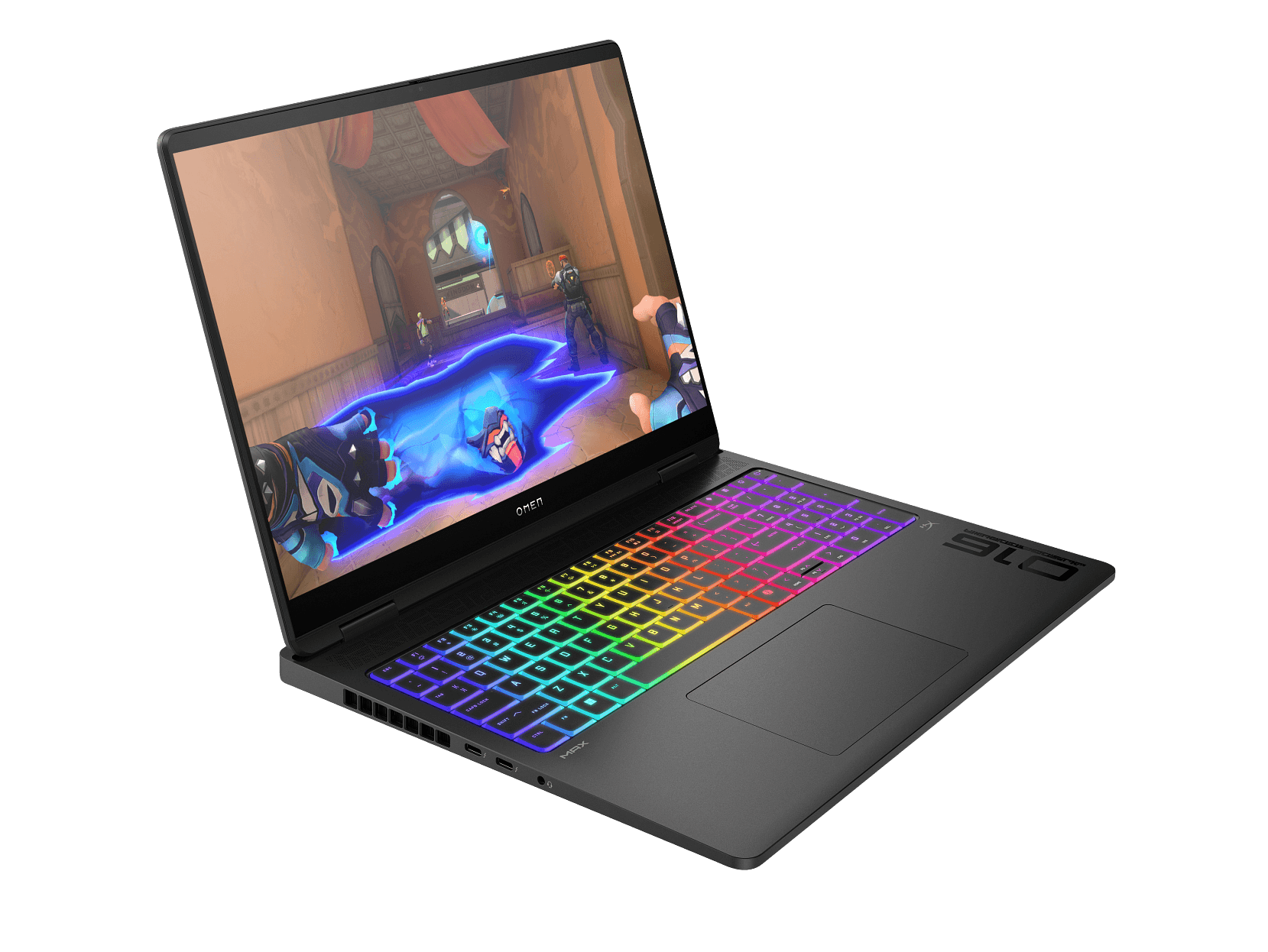
HP’s OMEN Max sits at the very top of its gaming range, the line where HP throws its best cooling, its best display, and its most serious hardware at the problem. The 16-ah0013TX configuration is a proper flagship, built to go toe to toe with the likes of Lenovo’s Legion Pro 7.
What you’re getting here is an Intel Core Ultra 9 275HX, an NVIDIA RTX 5080 with 16GB of GDDR7, 32GB of DDR5 RAM, and a 16-inch 240Hz OLED display. It’s a desktop replacement that wants to be your only machine, gaming rig and workstation in one.
It caught my eye because HP has it on a solid sale right now, and there’s an even cheaper price floating around if you know where to look. So is this the flagship to beat, or does the Legion Pro 7 still have its measure? Let’s dig in.
Pros
- RTX 5080 runs at the full 175W for max performance
- Stunning 240Hz OLED display
- Strong pricing with a real discount
Cons
- Heavy, with a chunky 330W charger
- Battery life is short
- Gets warm under heavy load
Key Specifications
- Display: 16″ WQXGA (2560 x 1600), OLED, 48-240Hz, 0.2ms response time, 100% DCI-P3, SDR 400 nits / HDR 500 nits, flicker-free, Low Blue Light, edge-to-edge glass
- Processor: Intel Core Ultra 9 275HX (24 cores, 24 threads, up to 5.4GHz, 36MB L3 cache)
- NPU: Intel AI Boost (13 TOPS)
- Graphics: NVIDIA GeForce RTX 5080 Laptop GPU, 16GB GDDR7, up to 175W TGP
- Memory: 32GB DDR5-5600 (2 x 16GB)
- Storage: 1TB PCIe Gen4 NVMe SSD, two M.2 slots (one free for expansion)
- Operating System: Windows 11 Home
- Wireless: Intel Wi-Fi 7 BE200 (2×2), Bluetooth 5.4
- Ports: 2x USB-A (10Gbps), 2x Thunderbolt 4 / USB-C (40Gbps, USB PD 3.1, DisplayPort 2.1, Sleep and Charge), HDMI 2.1, 2.5GbE Ethernet (RJ-45), 3.5mm combo audio jack, AC smart pin power
- Camera: 1080p FHD IR camera (Windows Hello), privacy shutter, dual array mics
- Audio: Dual speakers, DTS:X Ultra, HP Audio Boost, HyperX
- Keyboard: Full-size, per-key RGB backlit, numeric keypad, NKRO anti-ghosting
- Battery: 83Wh, 6-cell Li-ion polymer
- Power Adapter: 330W AC adapter
- Weight: 2.76kg
- Colour: Shadow Black
- Build: Sandblasted cover and base
- Security: Camera privacy shutter, Firmware TPM
- Cooling: OMEN Tempest Cooling (vapor chamber, liquid metal)
- Warranty: 1 year (parts and labour, no on-site repair)
- Part Number: B85MZPA
- Price: HP Store $4,499.10 (with 10% EOFY coupon), Emporium Electronics $4,599, JB Hi-Fi $6,999 (price match available)
Pricing
There’s a real spread on this laptop, and getting the best price takes a bit of know-how. But thanks to an EOFY coupon, the maths has landed somewhere genuinely good.
- HP Store Direct: $4,999, but a further 10% EOFY coupon at checkout brings it down to $4,499.10
- Emporium Electronics: $4,599 (a little-known retailer, just 1 unit left in stock)
- JB Hi-Fi: $6,999, but they price match
Here’s the headline: with HP’s 10% EOFY coupon applied at checkout, HP Direct drops to $4,499.10, which is actually cheaper than Emporium’s $4,599. That’s the best outcome you could hope for, because the lowest price is now also the safest. You’re buying straight from HP with genuine Australian stock and full manufacturer warranty, no chasing a single unit at an unfamiliar online store.
It’s worth saying clearly: HP’s pricing here is genuine, not the inflated-savings theatre we so often call out. Flagship RTX 5080 laptops sit comfortably in the $6,000 to $7,000+ range, and JB Hi-Fi’s $6,999 confirms the upper end of that. So even before the coupon, the $4,999 sale was a real discount. With the coupon on top, it’s a cracking price.
Just check the coupon before you commit
Coupons like this are usually time-limited (EOFY codes typically expire on or around 30 June), and they can be pulled or changed without notice. So:
- Apply the code at checkout and confirm the $4,499.10 total before paying. Don’t assume it’s still live.
- Note the expiry. If you’re weighing it up, don’t sit on it too long.
- Coupons can’t usually be stacked with a price match, so it’s one or the other. In this case the coupon wins anyway.
Still cheaper options to know about
The HP coupon is the easy winner, but for completeness:
- Emporium Electronics at $4,599 is now more expensive than HP’s couponed price, so there’s little reason to take on the risk of an unfamiliar retailer with one unit left. Skip it unless the HP coupon expires.
- JB Hi-Fi at $6,999 will price match if you prefer buying in person and walking out with stock the same day. Note, though, that JB matches a competitor’s advertised price, not another retailer’s coupon discount, so they’d match HP’s $4,999 ticket rather than the $4,499.10 couponed figure. That makes the HP coupon the cheaper route. JB is still a solid option if you specifically want to buy in store, just not the cheapest.
The sensible bottom line
For once, this is simple:
- Buy from HP Direct with the 10% EOFY coupon at $4,499.10. It’s the cheapest price, from the manufacturer, with full warranty and genuine stock. Just confirm the code still applies at checkout before paying, since EOFY coupons expire.
- If the coupon has expired, fall back to asking JB Hi-Fi to match HP’s $4,999 (you can walk out the same day with stock), or buy HP Direct at $4,999.
- Emporium Electronics at $4,599 only really comes back into play if the HP coupon is gone and you’ve done your homework on the retailer.
For more on the broader pricing landscape, see my laptop price increase warning and my piece on how AI is pushing up the cost of computers and parts.
Display
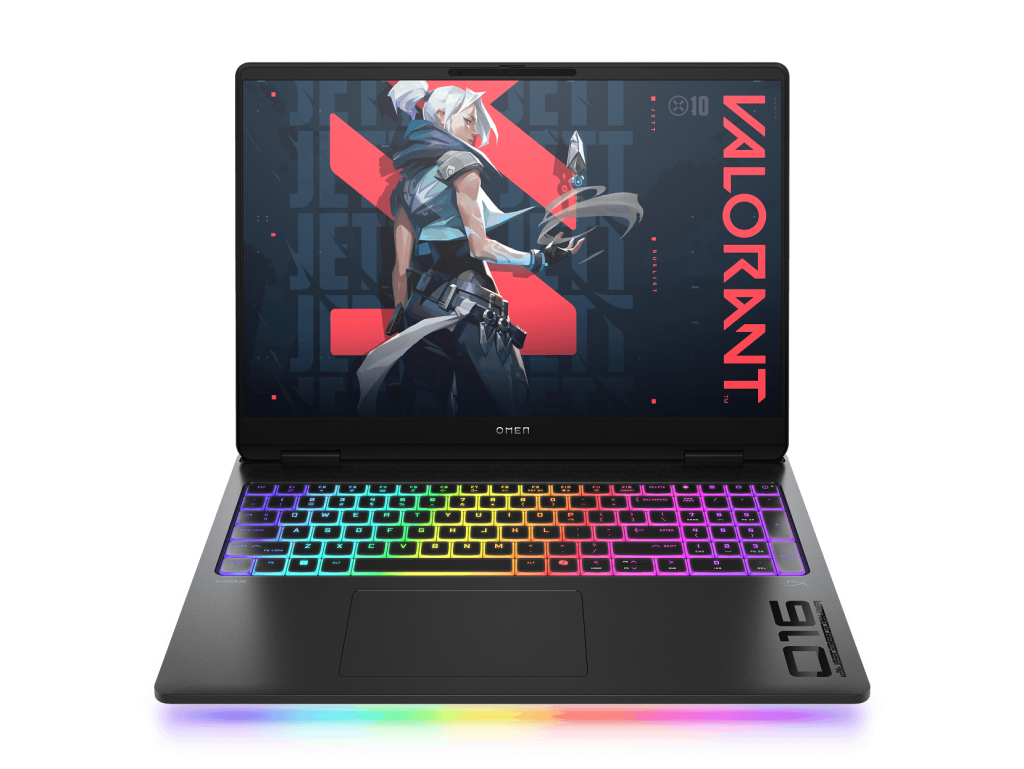
The 16-inch OLED display is a highlight, as you’d expect at this tier.
What you’re getting:
- 2560 x 1600 (WQXGA) resolution with a 16:10 aspect ratio
- 48 to 240Hz variable refresh for smooth gaming and battery-saving flexibility
- OLED panel with perfect blacks and a 1,000,000:1 dynamic contrast ratio
- 0.2ms response time for zero perceptible motion blur
- 100% DCI-P3 colour coverage
- 400 nits SDR, 500 nits HDR brightness
- Flicker-free and Low Blue Light certified for eye comfort
- Edge-to-edge glass with a micro-edge design
For gaming, the 240Hz refresh rate paired with OLED’s near-instant 0.2ms response is exceptional. Fast-paced titles look razor-sharp with no smearing, and the variable refresh (down to 48Hz) helps with both tearing and battery life when you’re not gaming. Dark scenes look superb thanks to OLED’s true blacks, and the 1.07 billion colours in HDR mode make for rich, vibrant visuals.
For creative work, 100% DCI-P3 coverage makes this a capable display for photo and video editing alongside gaming.
One small note for the spec-watchers: the HDR brightness here peaks at 500 nits, which is a touch lower than some rival flagships that hit 1000+ nits peak HDR (the Legion Pro 7, for one). In practice it still looks excellent, but if absolute peak HDR brightness is your priority, it’s worth knowing.
The usual OLED caveats apply: the glossy glass reflects light in bright rooms, and long-term burn-in is a consideration with static UI elements. For most users these are minor trade-offs against a genuinely beautiful screen.
Performance
This is where the OMEN Max makes its strongest case, and it’s a slightly different argument to the Legion Pro 7.
The Intel Core Ultra 9 275HX is Intel’s current flagship mobile gaming chip, with 24 cores and a 5.4GHz boost. It’s the same CPU as the top-tier Legion Pro 7, and it handles gaming, content creation, and heavy multitasking without breaking a sweat. The CPU will rarely be your bottleneck.
The 32GB of DDR5-5600 RAM is plenty for gaming and comfortable for most content creation. It’s half the Legion Pro 7’s 64GB and a touch slower (5600 vs 6400), but unless you’re running virtual machines or very heavy professional workloads, 32GB is the right amount for most people. You won’t notice the difference in games.
The VRAM and TGP story, done right
Here’s where the OMEN Max genuinely shines, and where it arguably makes more sense than its pricier rivals.
The RTX 5080 with 16GB of GDDR7 hits the future-proofing sweet spot. If you read my Lenovo Legion 5i review, you’ll remember its RTX 5070’s 8GB VRAM was my main concern for 1440p gaming longevity. The OMEN Max’s 16GB comfortably clears that bar. It’s enough for maxed-out textures and ray tracing at 1440p, and plenty for serious 4K gaming on an external display, without paying for the 24GB excess of an RTX 5090 that gaming can’t really use yet.
Just as importantly, HP runs this RTX 5080 at the full 175W TGP, the maximum the GPU is designed for. As I explained in the Legion reviews, the same GPU chip can be configured at wildly different power levels, and a higher TGP means meaningfully more real-world performance. HP hasn’t cut corners here. You’re getting the 5080 at full noise, not a power-starved version. If you want to understand how TGP, VRAM, and GPU tiers translate to real performance, my gaming laptop buying guide breaks it all down.
Gaming performance summary
At 1440p (the native resolution), expect to comfortably max out modern AAA titles at high frame rates, often well above 100 FPS, even with ray tracing and DLSS 4. Competitive titles will saturate the 240Hz panel easily. Plug into a 4K display via HDMI 2.1 or DisplayPort 2.1, and the full-power 5080 has the grunt for serious 4K gaming too.
The RTX 5080 at 175W lands in a genuine sweet spot: very close to RTX 5090 gaming performance in most titles, at a noticeably lower price, with VRAM that’s future-proof without being overkill.
Thermals
The honest trade-off for this much power is heat. An RTX 5080 at 175W plus an Ultra 9 275HX generates a serious thermal load, and a laptop chassis can only do so much with it.
Under heavy sustained load, the OMEN Max does get warm, and the fans get loud. That’s physics, not a fault. To HP’s credit, the OMEN Tempest Cooling system (vapour chamber and liquid metal on the key components) keeps things within safe limits and avoids serious throttling, which is impressive given the wattage on offer. But you’ll feel the warmth around the keyboard during long gaming sessions, and you’ll hear the fans.
Practical advice is the same as for any flagship: keep it on a hard, flat surface, consider a cooling pad for marathon sessions, and use a headset to mask the fan noise. For desk use, it’s completely manageable. Just don’t expect a cool, silent machine when you’re pushing it hard.
Keyboard and Trackpad
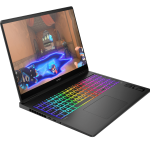
The full-size per-key RGB keyboard is excellent for gaming. The NKRO (N-key rollover) anti-ghosting technology means every keypress registers no matter how many keys you’re mashing at once, which genuinely matters in fast-paced games. Key travel is satisfying, the layout includes a number pad, and the per-key RGB allows detailed customisation through the OMEN Gaming Hub.
The trackpad is a standard buttonless surface. It’s perfectly functional for desktop navigation, though like nearly every gaming laptop, you’ll want a proper mouse for gaming. Nothing to complain about, but nothing standout either.
Audio
The dual-speaker setup is tuned with DTS:X Ultra, HP Audio Boost, and HyperX processing. It’s competent for a gaming laptop, loud and clear enough for video calls, casual gaming, and media. The DTS:X processing helps with positional audio in games.
For serious gaming or music, you’ll still want a headset, as built-in laptop speakers rarely deliver much bass. The HyperX integration is a nice touch though: you can instant-pair compatible HyperX wireless headsets quickly, which suits the gaming crowd.
Ports and Connectivity
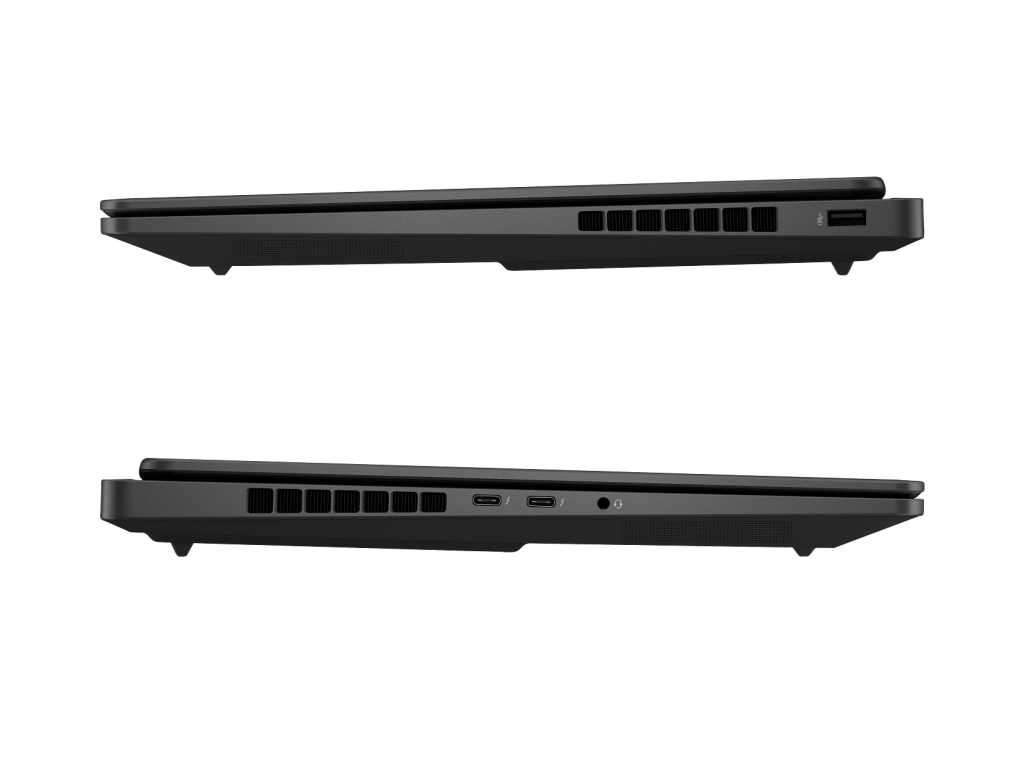
The port selection is strong, with one notable talking point:
- 2x USB-A (10Gbps)
- 2x Thunderbolt 4 / USB-C (40Gbps, USB Power Delivery 3.1, DisplayPort 2.1, Sleep and Charge)
- HDMI 2.1 (up to 8K/60Hz)
- 2.5GbE Ethernet (RJ-45)
- 3.5mm combo audio jack
- AC smart pin power connector
Two Thunderbolt 4 ports is genuinely generous, opening up high-speed external storage, eGPU docks, multiple external displays, and fast peripherals. The 2.5GbE Ethernet is excellent for stable, low-latency online gaming and fast local networks. HDMI 2.1 handles 4K/120Hz or 8K/60Hz external displays.
The one gripe, and one worth flagging, is the absence of Thunderbolt 5. TB5 has started appearing on some 2026 flagships, doubling the bandwidth of TB4. On a $5,000-plus machine, its omission is a fair criticism, even if TB4 is still plenty fast for the vast majority of users. If you’re planning to run cutting-edge external GPUs or extreme multi-display setups down the track, it’s worth noting.
On wireless, the OMEN Max uses the Intel Wi-Fi 7 BE200 card. This is worth calling out as a plus, because it’s the more reliable Wi-Fi 7 chip. The MediaTek cards in some rival laptops have had driver quirks, so seeing Intel’s BE200 here is genuinely reassuring. Bluetooth 5.4 handles wireless peripherals.
Battery Life
The 83Wh battery is slightly larger than some rivals, but it’s feeding an RTX 5080 and an Ultra 9, so battery life is short. This is the universal reality of flagship gaming laptops.
Real-world expectations:
- Light use (browsing, video, GPU idle): 4 to 5 hours
- Mixed productivity: around 3 hours
- Gaming on battery: roughly an hour, with significantly reduced performance
Fast charging helps, with HP quoting around 50% in 30 minutes, which is handy for quick top-ups. But the bottom line is that this is a desktop replacement. You’ll keep it plugged in almost all the time, and that’s by design.
The 330W charger is large and heavy, as you’d expect. It’s a touch lighter than the Legion Pro 7’s 400W brick, but combined with the 2.76kg laptop, your bag will still be heavy. This isn’t a machine you carry around casually.
A Few Things to Know Before Buying
- It’s heavy. At 2.76kg plus a 330W brick, this is a transportable desktop, not a daily carry. Factor that in if you move between locations.
- IR camera for face login. The 1080p IR webcam supports Windows Hello facial recognition, so you can log in just by looking at it. There’s no fingerprint reader, but the IR camera covers biometric login, and the privacy shutter is a nice security touch.
- Storage is expandable. You get a 1TB drive plus a free second M.2 slot, so adding more fast storage later is easy.
- Expect some bloatware. Like most big-brand gaming laptops, it ships with OMEN Gaming Hub plus various trials (Adobe, McAfee). OMEN Gaming Hub itself is worth keeping, as it controls performance modes, fan curves, and RGB. The trials you can clear out.
Who Is This Laptop For?
The OMEN Max 16-ah0013TX suits a specific kind of buyer.
Genuinely good for:
- Enthusiast gamers who want near-flagship performance and a stunning 240Hz OLED
- Buyers who want the performance sweet spot of a full-power RTX 5080 with future-proof 16GB VRAM, without paying for an RTX 5090
- Content creators doing video, photo, or 3D work alongside gaming
- Anyone wanting a single machine to replace both a gaming desktop and a workstation
- Buyers who’ll game at a desk and don’t need portability
Not the right laptop for:
- Anyone who needs portability (it’s heavy, with a chunky charger)
- Budget-conscious gamers (the Legion 5i 15 Gen 10 does the job for most people at far less)
- Buyers who want all-day battery life
- Anyone who needs Thunderbolt 5 for cutting-edge external hardware
For context, my HP Victus 16 review covers the budget end of gaming, and the Legion 5i 15 Gen 10 handles the sensible mid-range. The OMEN Max sits near the top, alongside the Legion Pro 7. If you’re not yet sure which tier suits you, it’s worth working out how to choose a gaming laptop before you spend big.
Pros
- Full 175W RTX 5080, the maximum the GPU is designed for, so no power-starved performance
- 16GB GDDR7 VRAM is a genuine future-proof sweet spot for 1440p and 4K gaming
- Same flagship Intel Core Ultra 9 275HX as pricier rivals
- Stunning 16-inch 240Hz OLED with 0.2ms response, 100% DCI-P3, and variable refresh
- Intel Wi-Fi 7 BE200, the more reliable Wi-Fi 7 chip
- Two Thunderbolt 4 ports plus 2.5GbE Ethernet and HDMI 2.1
- 32GB DDR5 dual-channel RAM, plenty for gaming and most creative work
- Per-key RGB keyboard with NKRO anti-ghosting
- IR camera for Windows Hello face login, plus privacy shutter
- OMEN Tempest Cooling keeps a high-power chassis in check
- Free second M.2 slot for storage expansion
- Genuinely strong pricing, with a real discount at the HP Store
- Fast charging (around 50% in 30 minutes)
Cons
- Heavy at 2.76kg, with a chunky 330W charger
- Gets warm and the fans get loud under sustained load
- Battery life is short (the price of flagship hardware)
- No Thunderbolt 5
- HDR peak brightness (500 nits) is lower than some rival flagships
- Dual speakers only (no dedicated woofer/tweeter array)
- 1-year warranty with no on-site repair
- OLED burn-in is a long-term consideration with static UI elements
- Cheapest price (Emporium Electronics) comes with stock and retailer caveats
My Final Verdict
The HP OMEN Max 16-ah0013TX is an excellent flagship that arguably makes more sense than its pricier rivals for most buyers. The headline is the full-power 175W RTX 5080 paired with 16GB of VRAM. That combination is the genuine sweet spot of current mobile gaming: future-proof memory, maximum GPU power, and gaming performance that lands very close to an RTX 5090 in most titles, for noticeably less money.
Add a stunning 240Hz OLED, the same flagship Ultra 9 275HX CPU as the most expensive machines, the more reliable Intel Wi-Fi 7 card, and a comprehensive port selection, and you’ve got a seriously complete package.
The compromises are the expected ones for this class. It’s heavy, the charger is a brick, it runs warm and loud under full load, and the battery life is short. The lack of Thunderbolt 5 is a fair gripe at this price, and the HDR brightness sits a notch below the very best rivals. None of these are dealbreakers, but they’re worth understanding before you commit.
On pricing, this is one of the better-value flagships around right now, and an EOFY coupon makes it a genuine bargain. HP’s $4,999 sale is already a real discount, not manufactured savings, and a further 10% EOFY coupon at checkout brings it down to $4,499.10. That undercuts even the cheapest little-known retailer, which means the lowest price is also the safest: straight from HP with full warranty and genuine stock. Just confirm the coupon still applies before you pay, since EOFY codes expire. If it’s gone, ask JB Hi-Fi to match HP’s $4,999 and walk out the same day with stock. Either way, you’re getting a flagship at a sharp price.
Should you buy it?
Yes, especially at $4,499.10 with the EOFY coupon, if you:
- Want near-flagship gaming performance at a sharper price than an RTX 5090 machine
- Value the future-proof 16GB VRAM sweet spot
- Want a beautiful 240Hz OLED for gaming and creative work
- Need a single machine to replace a gaming desktop and a workstation
- Game at a desk and don’t need portability
Look elsewhere if you:
- Need a portable laptop (this is a transportable desktop)
- Don’t genuinely need this much power (the cheaper Legion 5i suits most gamers)
- Want all-day battery life
- Specifically need Thunderbolt 5 or absolute peak HDR brightness
The OMEN Max 16-ah0013TX (B85MZPA) is a smartly judged flagship. It doesn’t chase headline specs for the sake of it. Instead it nails the combination that actually matters for gaming, a full-power GPU with the right amount of VRAM, and pairs it with a gorgeous display and strong connectivity. For the buyer who wants flagship performance without flagship excess, and who shops the price smartly, it’s one of the most sensible high-end gaming laptops you can buy in Australia right now.